
Business software integration means connecting the tools you already use, such as your phone system, CRM, calendar, billing and messaging, so data moves between them on its own instead of through someone’s keyboard. The fastest way to get value is to start with one workflow that hurts today, map it, connect only the systems it touches, and build it around how your team already works. We build integrations that way at GLPS Memphis, and this guide shows the steps, the approaches and the pitfalls.
TL;DR
- Integration connects your existing apps so information is entered once and shows up everywhere it is needed.
- Pick one painful workflow first (missed calls, follow-ups, event RSVPs, onboarding), not a company-wide overhaul.
- Choose an approach by data volume, complexity, technical capacity and how often the process changes.
- Plan security, data quality and ownership of maintenance before launch, not after.
- Practical, workflow-first integration beats buying more tools: understand the process, then build, then keep improving it.
Table of Contents
- What business software integration actually means
- Why businesses integrate their software
- Examples that show what integration looks like in practice
- The main approaches to integration
- How to choose: four questions
- Step by step: how to integrate business software
- What to plan for: security, data quality, upkeep and growth
- Where we fit
- A simple worked example
- How to tell your integration is working
- FAQ
- Sources
What business software integration actually means
Integration is the practice of linking separate software systems so they exchange and reuse data. AWS describes business system integration as combining different business software into one cohesive operation, and notes it is often needed because teams picked different tools, or because of acquisitions, expansions and process changes.
You will also see it called application integration, systems integration or enterprise application integration (EAI). TechTarget defines EAI as connecting business applications, services and databases into a framework where data changes in one system are correctly reflected in the others. The labels differ in scale, but the idea is the same: stop retyping.
A plain example. A customer calls your shop and nobody picks up. Without integration, that missed call is a number on a phone log that someone may or may not check. With integration, the phone system triggers a text to the caller, the conversation lands where your team works, and a follow-up task exists before anyone has to remember it.
Why businesses integrate their software
Most small and mid-sized companies did not plan their software stack. They added a scheduling tool, then a payment tool, then a texting tool, each solving one problem. SAP points out that organizations rely on a mix of systems introduced at different times, and that without integration the gaps show up as inconsistent data, processes that break at handoffs, and manual workarounds.
In day-to-day terms, the payoff looks like this:
- Less double entry. Data goes in once. That removes a common source of typos and mismatched records.
- Faster response. A trigger in one system (a missed call, a signed form, a paid invoice) starts the next step immediately.
- One version of the truth. Everyone looks at the same customer record, so teams stop asking each other for exports.
- Freedom to choose tools. AWS notes that integration lets organizations use several lower-cost standalone applications with data interfaces between them instead of buying one costly all-in-one system.
Notice what this list is not: a promise that a connected stack runs itself. Integration pays off when it is aimed at a specific process with a specific owner.
Examples that show what integration looks like in practice
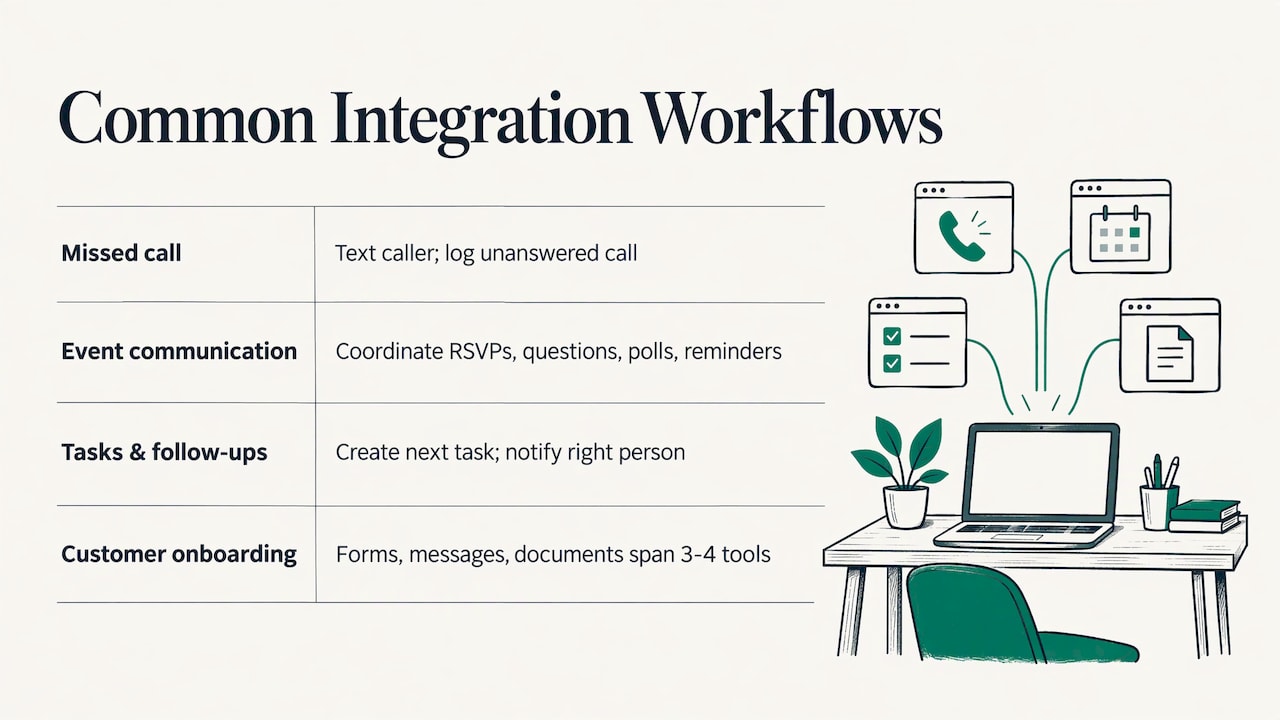
The best way to decide what to integrate is to look at workflows where information already moves by hand. Four common ones:
Missed call recovery. When a call goes unanswered, the system sends a text to the caller and logs the event. Our Missed Call Recovery service automates this customer communication by SMS, and our guide to how missed call text back works walks through the setup.
Event communication. An event host collects RSVPs, answers the same guest questions, runs polls and sends reminders. Connecting those messages to one coordinator removes hours of manual texting. Our Autonomous SMS Event Coordinator automates RSVPs, guest queries, polls and reminders for event hosts.
Tasks, reminders and follow-ups. When a deal closes or a job finishes, someone has to create the next task and ping the right person. Project G3 is our AI-powered assistant for tasks, reminders, check-ins and follow-ups.
Customer onboarding. Forms, welcome messages, document requests and account setup often span three or four tools. We cover what to automate and what to keep human in our guide to customer onboarding automation.
Larger organizations connect finance, supply chain and HR systems the same way, but the reasoning is identical: find the handoff where a person is acting as the connector, and let software do that job.
The main approaches to integration
There is no single correct method. Shopify’s guide identifies three main types of cloud application integration: direct or native integrations, iPaaS, and custom API integrations, and notes one stack can use more than one. Here is what each means in plain terms.
| Approach | What it is | Fits when | Watch for |
|---|---|---|---|
| Native integration | Two products offer a built-in connection | Both tools are popular and the flow is simple | The connection only does what the vendors built |
| iPaaS (integration platform as a service) | Cloud middleware with a visual builder that links many apps | Several standard apps, moderate complexity | Per-task or per-connection costs grow with volume |
| Point-to-point | A direct link between two systems | Only two systems are involved | Gets tangled as you add systems |
| Custom API integration | Software written to connect systems exactly as your process works | Unusual workflows, specific rules, systems with no ready connector | Needs a team that can build it and keep it running |
| EAI or enterprise bus | A central layer for many systems, often on premises | Large organizations with legacy systems and heavy oversight needs | Cost and complexity are rarely justified for a small team |
An API (application programming interface) is simply the doorway one program offers so another can send or request data. Most modern business tools have one, which is what makes custom integration possible.
If you are weighing a ready-made connection against software built around your process, our explainer on when custom business software pays off lays out the decision.
How to choose: four questions
Before you commit, Shopify recommends evaluating four factors. They translate well to any business:
- Data volume and frequency. How many records move per day, and does the data need to arrive instantly or can it wait for a nightly batch? A text to a missed caller needs to be fast. A weekly report does not.
- Transformation complexity. Does data pass through unchanged, or does it need reshaping and conditional rules, such as “only send this reminder if the guest has not confirmed”?
- Technical capacity. Does anyone on your team have the time and skills to build and maintain the connection? If not, the maintenance question matters as much as the build.
- Rate of change. Stable flows suit prebuilt connectors. Processes that keep evolving need something you can modify.
If your answers are “low volume, simple, stable”, a native connection may be enough. If they are “time-sensitive, rule-heavy, changing”, you are describing a custom or consultant-built workflow. That is where our IT consulting and custom software work sits.
Step by step: how to integrate business software
1. Pick one workflow and a measurable goal
HubSpot’s guidance on integration best practices starts with clear, measurable objectives. Write the goal as a number you can check: “reply to every missed call within two minutes” or “cut manual RSVP texts to zero.” Vague goals (“be more efficient”) produce integrations nobody can judge.
Where it goes wrong: starting with the tool instead of the process. Teams buy a platform, then hunt for something to connect.
2. Inventory your systems and data flows
List every tool involved, what data each holds, and how information moves today, including the spreadsheets and sticky notes. Shopify’s checklist adds checking for existing connectors, estimating record volumes, confirming who maintains each connection, and flagging flows that touch payment or personal data.
Where it goes wrong: forgetting the human connector, the person who quietly copies data from one place to another every Friday. That person knows the real workflow.
3. Map the data journey
For each piece of data, write down where it starts, where it must end up, who owns it and who may see it. HubSpot calls this mapping the data journey. Decide which system is the source of truth for each field, such as customer phone number or appointment time, so two systems never overwrite each other.
Where it goes wrong: two systems each believing they are the master record.
4. Choose the approach
Use the four questions above. Prefer the simplest option that meets the goal. A custom build is justified when the process is specific to your business, when no connector exists, or when the workflow will keep changing.
This is the step where we spend the most time with clients. Our approach is to fully understand each client’s operational needs and workflow before building anything, so the system fits how your team already works rather than forcing a new routine.
5. Build, then test with real scenarios
Test the cases that actually happen: the caller who phones twice, the guest who replies with a question instead of “yes”, the record with a missing field. Confirm that failures are visible, not silent.
6. Launch narrow, then widen
Turn the integration on for one team, one location or one event first. Fix what real use reveals, then expand.
7. Monitor and keep improving
HubSpot advises tracking performance metrics, error rates and sync delays continuously. Assign someone to look at them weekly at first. We offer ongoing support and improvement after launch, because a workflow that worked in March rarely stays unchanged by December.
What to plan for: security, data quality, upkeep and growth
These are the issues that surface six months after launch, so settle them up front.
Security and access. Every connection is a doorway into a system that holds customer data. Give each integration only the permissions it needs, use encrypted connections, keep audit logs, and revoke access when a tool or employee leaves. NIST’s publication on protecting APIs in cloud-native systems takes a risk-based approach: identify where your interfaces are exposed, then apply controls in stages.
Texting and consent. If your integration sends SMS to customers or guests, you need their consent to be messaged and a clear way to opt out. Our SMS consent page explains how we handle it. For legal questions about your specific messaging program, consult an attorney who handles telecommunications compliance.
Data quality. Integration moves data faster, including bad data. Standardize phone number formats, decide how duplicates are handled, and define required fields before systems start talking to each other.
Maintenance ownership. Apps update their interfaces, retire features and change pricing. Name a person or a partner responsible for each integration. An unowned integration is the one that quietly breaks.
Scalability. Ask what happens at ten times the volume: a big event weekend, a seasonal rush, a marketing push. Cost per message or per task, and rate limits on the other system’s side, are the usual surprises.
Where we fit
If your goal is communication and workflow, not a sprawling enterprise architecture, practical technology is usually the better path. GLPS Memphis offers IT consulting and custom software built around your existing operations, and we keep refining the system after launch.
Here is how our offers map to common integration needs:
- Missed calls going unanswered: Missed Call Recovery automates SMS follow-up for the calls you could not take.
- Events with hundreds of guest messages: the Autonomous SMS Event Coordinator automates RSVPs, queries, polls and reminders.
- Tasks and follow-ups slipping through the cracks: Project G3 is an AI-powered assistant that streamlines tasks, reminders and follow-ups.
- A workflow no off-the-shelf tool fits: our IT consulting starts by understanding the process, then designs and builds around it.
If you are not sure which of these applies, start with a conversation about the one workflow you would fix first. You can see everything we do on our services page.
A simple worked example
Suppose you run a service business with a small front desk. Today, missed calls are noticed at the end of the day, the caller has usually phoned a competitor by then, and follow-ups live in someone’s head.
The integration goal: every missed call gets a text reply quickly, and a follow-up task is created for the team.
- Systems involved: phone system, SMS messaging, task list.
- Source of truth: the phone system for call events, the task list for follow-up status.
- Rules: send the text for missed calls during business hours; skip numbers already in an open conversation; create one task per caller, not per call.
- Checks: monitor delivery errors, confirm opt-out requests are honored, review the first two weeks of conversations.
Three systems, four rules, one measurable result. That is the scale at which integration pays off fastest, and it is why we recommend starting narrow.
How to tell your integration is working
A live integration should pass these checks each month:
- The goal metric (response time, hours of manual work, RSVP completion) is moving in the right direction.
- Error and failure counts are low and someone reviews them.
- Records in connected systems match when you spot-check ten of them.
- Permissions still reflect who actually needs access.
- The team uses the workflow instead of working around it.
If one of these slips, adjust the workflow rather than adding another tool.
FAQ
What is the difference between software integration and automation?
Integration connects systems so they can share data. Automation uses that connection to perform a task without a person, such as sending a reminder when a trigger fires. Most useful workflows need both.
What does EAI mean?
EAI stands for enterprise application integration. It is the practice of connecting an organization’s applications, services and databases into a framework for data exchange and automated processes, and it is usually associated with larger organizations and many systems.
How do I know which integration approach to use?
Look at four factors: data volume and speed, how complex the data rules are, whether you have technical staff to maintain it, and how often the process changes. Simple and stable favors a built-in connection. Time-sensitive, rule-heavy or changing workflows favor custom work.
Do I need to replace my current software to integrate it?
No. The point of integration is to keep the tools you already use and connect them. We design systems that fit into your existing operations, so your team does not have to learn an entirely new environment.
Where should a small business start?
With the one workflow that costs you the most time or customers, whether that is missed calls, event messaging or follow-ups. Define one measurable goal, connect only the systems involved, and expand after it works.
Sources
- AWS: What is Business System Integration?
- AWS: What is Application Integration?
- TechTarget: EAI (enterprise application integration)
- SAP: What Is Enterprise Integration and Why It Matters
- Shopify: Integrate Cloud Applications for Commerce (2026)
- HubSpot: Software integrations: A beginner’s guide
- NIST: Guidelines for API Protection for Cloud-Native Systems (SP 800-228)
Leave a Reply