
Custom SMS Event Coordination
SMS Event Coordinator for RSVPs, Headcounts, and Guest Follow-Ups
Every event is different. GLPS Memphis customizes the SMS Event Coordinator around your guest list, what you need to know from each guest, and the updates you want before event day.
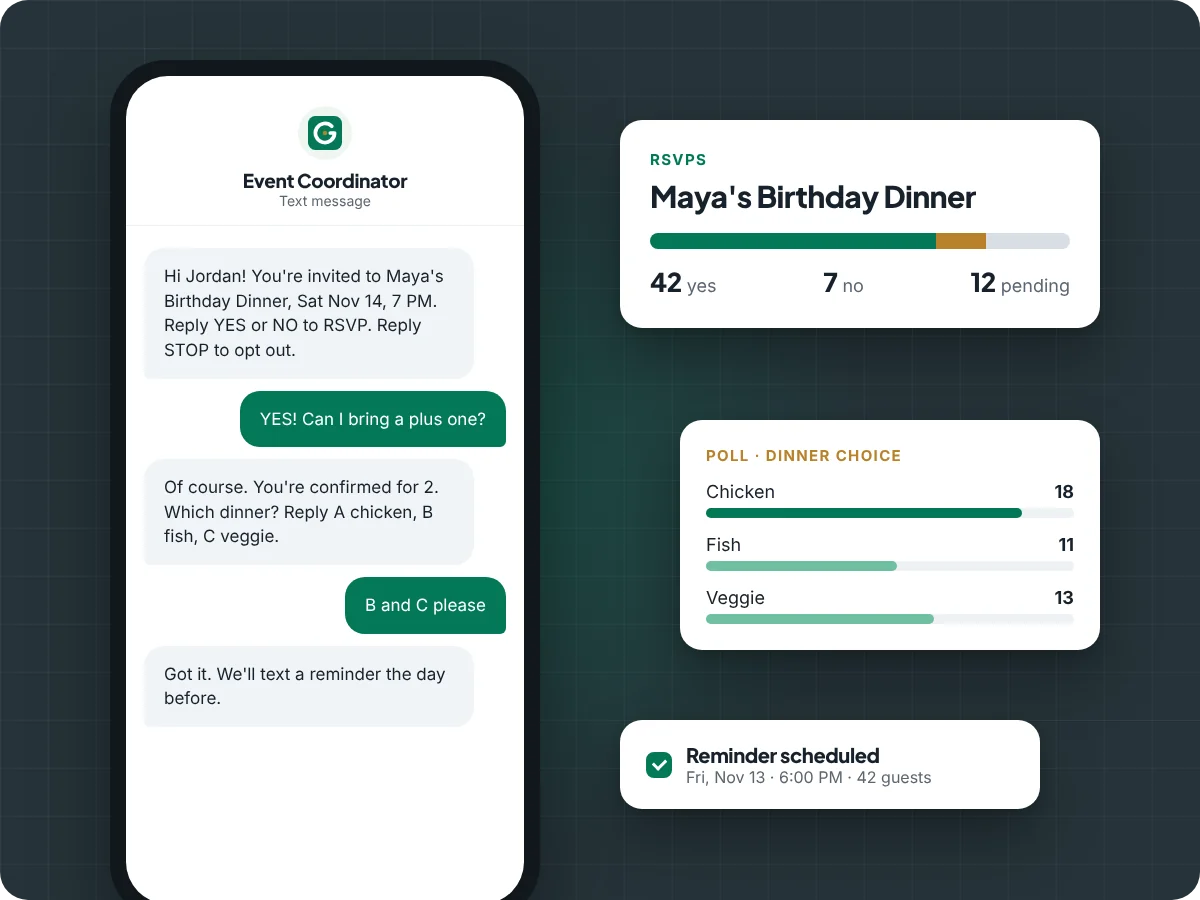
Customized around the event
The SMS Event Coordinator is a GLPS Memphis service for organizers who want event communication handled by text without building the workflow themselves. The setup can be simple for a family dinner or more detailed for a church gathering, community event, client event, potluck, team meeting, or workshop.
Instead of forcing every event into the same script, GLPS Memphis helps configure the questions, message flow, guest details, reminders, and organizer updates around what that event actually needs.
What the organizer provides
The organizer does not need to manage a complex setup. At minimum, GLPS Memphis needs the event basics, guest contacts, and what the organizer wants to know from each guest.
- Guest names and mobile numbers
- Event date, time, and basic event details
- The questions guests should answer
- The updates the organizer wants to receive
- Any reminders or follow-ups needed before the event
What guests can be asked
The workflow can be tailored around the information that matters for the event, not just a standard RSVP.
- Are you coming?
- How many people are you bringing?
- What are you bringing?
- Do you have a preference, constraint, or special note?
- What role, team, or arrival time applies to you?
RSVPs, headcounts, and guest details by text
For many events, the first question is simple: are you coming? After that, the organizer may need a headcount, supply commitment, arrival update, or another event-specific answer.
The SMS Event Coordinator can help collect those replies by text and keep each guest connected to their own event history, so the organizer can see who answered, who still needs attention, and what information is missing.
- Track yes, no, maybe, and unknown RSVP responses
- Collect headcount answers from confirmed guests
- Record what guests say they are bringing
- Review guests who have not answered a specific question
- Keep guest replies tied to the event instead of scattered across personal text threads
Configured follow-up messages
Events usually need more than one message. The coordinator can be configured with the organizer’s wording for invitations, headcount questions, supply questions, reminders, and other follow-ups.
Follow-up behavior is based on the event setup, guest eligibility, guest replies, and SMS permission. This helps the event stay organized without the organizer manually chasing every person one by one.
- Use event-specific message wording
- Ask different questions at different points in the event workflow
- Follow up with guests who have not answered
- Support reminders as the event gets closer
- Keep organizer review available for important decisions
Automated organizer updates until event day
The organizer can receive automated summary updates leading up to the event. These updates can help the organizer stay aware of guest progress without logging into a dashboard or reading every individual reply.
- Current RSVP and headcount summary
- Guests who have not responded yet
- Guests who answered some questions but still need follow-up
- What supplies or commitments are covered
- What still needs attention before the event
Ask your assigned event number by text
For supported event setups, the organizer can text the assigned event number with manual questions and receive responses by SMS. This gives the organizer a quick way to check event status while planning, shopping, traveling, or working on day-of details.
- Who has not replied yet?
- What is the current headcount?
- Who said they are bringing food?
- What is still missing?
- What should I follow up on next?
Supply and “what are you bringing?” tracking
Some events depend on guests bringing food, drinks, supplies, equipment, or other items. The SMS Event Coordinator can ask guests what they plan to bring and help the organizer compare guest replies against what the event still needs.
This is useful for potlucks, ministry meals, family gatherings, community programs, team events, and small private gatherings where missing supplies can become a day-of problem.
Best-fit event types
The service is designed for events where guest replies matter and SMS is the easiest way to reach people.
- Family dinners and reunions
- Birthday parties and private gatherings
- Church events and ministry gatherings
- Community events
- Business launches and small client events
- Team meals and internal gatherings
- Potlucks and supply-based events
- Small conferences or workshops
How setup works
GLPS Memphis works with the organizer to understand the event and configure the SMS workflow around the guest communication that matters most.
- Talk with GLPS Memphis about the event.
- Provide the guest contacts and basic event details.
- Define what you need or want to know from each guest.
- Confirm message wording, reminders, and organizer update needs.
- Confirm SMS permission requirements before guest messaging starts.
- Receive updates and ask event questions by text as the event approaches.
SMS consent and compliance
SMS communication requires proper permission. Event messaging should only be sent to guests who are eligible to receive texts for that event. Message frequency can vary based on the event workflow. Message and data rates may apply. Guests can reply STOP to opt out and HELP for help.
Review the SMS Consent, Privacy Policy, and Terms and Conditions pages for more information.
Frequently asked questions
How customized can the SMS Event Coordinator be?
The workflow can be customized around the event type, guest list, message wording, reply questions, reminders, supply needs, and organizer update preferences.
What does the organizer need to provide?
At minimum, the organizer provides guest contacts, event basics, and what they need or want to know from each guest. GLPS Memphis can help turn that into the event message workflow.
Can guests RSVP by text?
Yes, supported event workflows can collect RSVP replies by SMS and keep those replies connected to each guest’s event record.
Can it ask guests how many people they are bringing?
Yes. The organizer can include a headcount question in the event message flow so guests can reply with how many people are attending.
Can it track what guests are bringing?
Yes, the event workflow can ask guests what they plan to bring and help the organizer review those replies against event supply needs.
Can the organizer get automated updates?
Yes, organizer updates can be configured so the organizer receives event summaries leading up to the day of the event.
Can the organizer text questions to the event number?
For supported setups, yes. The organizer can text the assigned event number to ask about guest replies, headcount, missing details, supplies, and next follow-ups.
Do guests need to opt in to receive SMS messages?
Event SMS communication should only be sent where proper permission exists. Guests can reply STOP to opt out and HELP for help. See the SMS Consent, Privacy Policy, and Terms and Conditions pages for more information.
How do I get started?
Contact GLPS Memphis through the contact page. GLPS Memphis can discuss your event, guest communication needs, and whether the SMS Event Coordinator is a good fit.
Ready to coordinate your event by text?
GLPS Memphis can help customize an SMS event workflow for RSVPs, headcounts, guest follow-ups, organizer updates, reminders, and supply tracking.