
The fastest way to automate administrative tasks is to start with one repetitive, rule-based job, such as reminders, follow-ups, invoicing or missed-call replies. Write down the rule, automate it, and keep a person in charge of anything that touches money, customers or sensitive data. The work is not buying a tool. The work is understanding how your process runs today, so the automation fits your operation instead of adding another system to manage. That is how we build at GLPS Memphis, through Project G3, our AI-powered assistant for tasks, reminders, check-ins and follow-ups.
This guide is for owners, operations managers and event organizers who lose hours every week to scheduling, chasing replies, answering the same questions and following up. It covers what to automate, how to do it in steps, where automations go wrong, and what to hand to people who build these systems for a living.
TL;DR
- Automate tasks that are repetitive, rule-based and frequent. If a task comes up only a few times a year, leave it manual.
- Write each rule in one sentence (“When X happens, do Y”), list the information that moves, then build, test on a real case and watch the first week.
- Keep a person in the loop for anything that spends money, sends to many people, deletes data or handles personal information.
- Reminders, follow-ups, event RSVPs and missed-call replies are some of the cleanest first automations, because the rules are simple and the message is short.
- Plan for upkeep: someone should own each automation and know how to fix it when a step breaks.
Table of Contents
- What “administrative automation” means in practice
- Which administrative tasks are worth automating first
- A step-by-step method for automating a task
- Automating event communication
- Recovering missed calls automatically
- Keeping a human in charge
- Choosing between a ready-made tool and a custom build
- How GLPS Memphis helps
- A first-month plan
- FAQ
- Sources
What “administrative automation” means in practice
Administrative automation means a system performs a routine office job for you when a trigger occurs. A trigger might be a new form entry, an incoming email, a missed call, a date on the calendar or a guest who has not replied. The system then takes an action: it sends a message, updates a record, creates a task or flags something for review.
There are two broad kinds, and the difference decides how much supervision you need. One guide to AI task automation describes AI task automation as using AI and machine learning to handle repetitive, rule-based work. Examples include email triage and drafting, calendar scheduling, data entry, support ticket routing and workflows that trigger across apps. Unlike a rigid script, AI can interpret context and cope with variations in wording.
One small-business guide separates the two failure modes clearly. Fixed automations break in predictable ways, while AI agents can take an action you did not intend. A fixed workflow fails when a step breaks. An AI agent fails when it does something you never asked for. The safeguard for the first is run history and error alerts. The safeguard for the second is approval before it sends, pays or deletes.
That is why the same business can safely automate appointment reminders on day one and should be careful about letting software issue refunds.
Which administrative tasks are worth automating first
Start where the volume is high and the rules are clear. A useful test is to ask three questions about each task. Does it happen at least weekly? Can you describe the correct outcome in a sentence? Would a mistake be easy to catch and cheap to fix? Three yeses make a good candidate.
Finance and back-office work
Business.com’s guide for small-business owners puts numbers on the common back-office jobs. Automated invoicing and payment collection saves 3 to 5 hours a week, and payment reminders get businesses paid about five days faster on average. The same article estimates payroll automation at 1 to 2 hours a week, expense tracking and categorization at 2 to 3 hours, financial reporting at 1 to 2 hours and bank reconciliation at 1 to 2 hours.
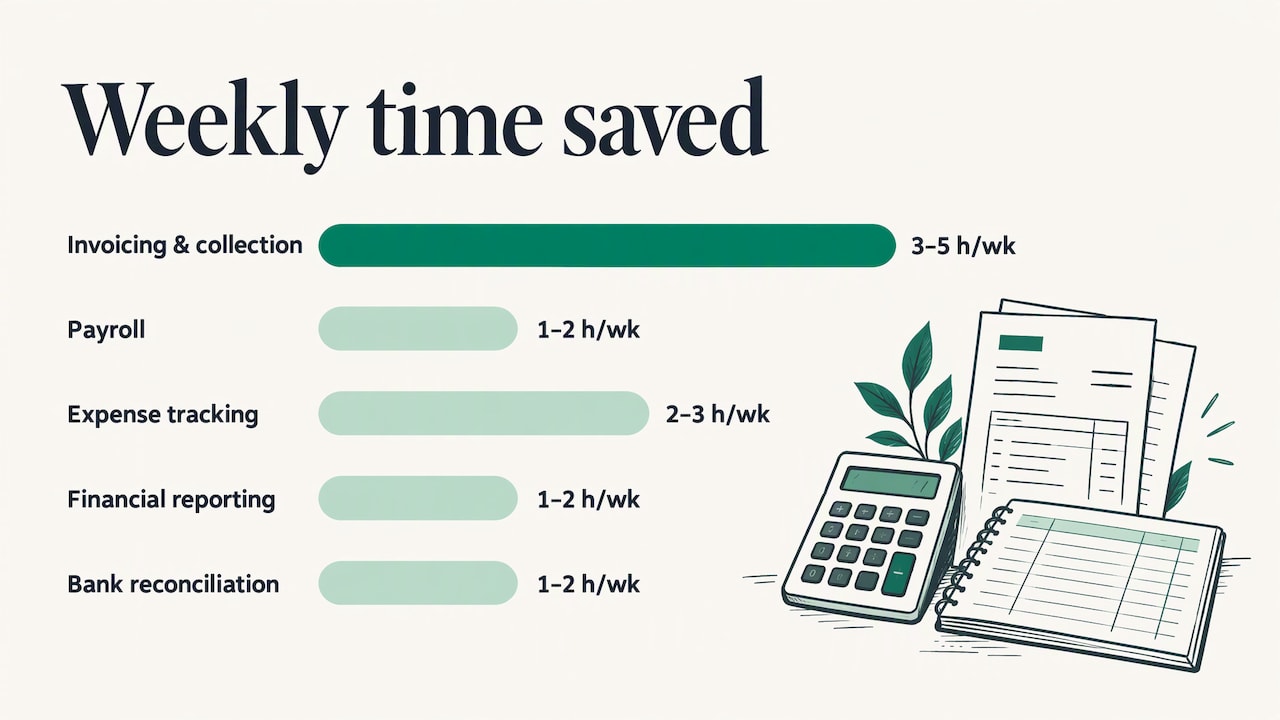
Treat those as the publisher’s estimates for typical small businesses, not a promise for your shop. Add them up for the jobs you actually do and you can see why many owners start here. If you run a contracting or home-service business, a business expense management system shows how receipts, categories and monthly financials can be organized so the bookkeeping stops piling up.
Scheduling, reminders and follow-ups
These are the tasks that quietly eat a day. Confirming appointments, nudging a client who has not answered, reminding a team member of a deadline and checking in after a job all follow simple rules. They also depend on timing, which people forget and software does not.
This is the territory Project G3 is built for: tasks, reminders, check-ins and follow-ups handled by an AI-powered assistant so nothing depends on someone remembering to send the message.
Customer communication
Answering the same five questions, acknowledging a request, or replying to someone who called and did not reach you are all rule-based. The goal is not to replace the relationship. It is to make sure the first response is fast and consistent, so the human conversation starts from a better place. If you are thinking about the early steps of a customer relationship, our guide to customer onboarding automation covers what to automate and what to keep human.
Event administration
An event generates a burst of administrative work: invitations, RSVPs, dietary questions, directions, polls, reminders and day-of changes. Guests reply by text, in different words, at all hours. This is where automation saves the most time per event and where a person answering every message by hand is hardest to sustain.
A step-by-step method for automating a task
The steps below combine two published beginner methods with what we see as the common-sense order. One is a five-step approach from Nova for Work: write the rule, list the data, build, test, then watch. Another breaks every automation into six components, which Ziplines’ beginner’s guide lists as a trigger, input or context, AI instructions, conditions or rules, an output or destination, and review or monitoring.
Step 1: Write the rule in one sentence
Use the form “When [event], then [action] in [tool].” For example: “When a guest has not replied three days before the event, send one reminder text.” If you cannot say it in one sentence, the task is not ready. It probably has exceptions that nobody has written down.
Where it goes wrong: the rule lives in one person’s head. Ask the person who does the task today what they do when things are unusual. Those exceptions decide whether the automation holds up.
What we do here: at GLPS Memphis we start by understanding your specific workflow before we build anything, so the rule is based on how your operation runs, not on a template.
Step 2: List the information that moves
Name every piece of data the task uses: a phone number, a name, a date, an appointment type, an amount. Then name where each piece lives today. The most common cause of a broken automation is information that sits in three places and disagrees with itself.
Where it goes wrong: the data is incomplete or out of date. An automation that texts the wrong number or the wrong date does damage faster than a person would.
Step 3: Build the flow and read what it will do
Build the trigger, the conditions and the action. Before saving, read the trigger and every action in plain words and check that they match your rule. Most no-code builders now let you describe the flow in natural language. Computerworld’s walkthrough of one office-suite builder notes that non-programmers can build flows from prebuilt steps or plain-language descriptions, with triggers such as schedules, incoming emails and spreadsheet changes.
That makes simple flows easy. It does not make integration easy. A builder that connects to your email and calendar may not connect to your phone system, your customer list or the way your team really works. When the process crosses several systems, custom work is often what makes it hold together. Our overview of custom business software explains when that investment pays off.
What we do here: our approach is to build practical technology that integrates with the operations you already have, rather than asking you to rebuild around a new tool.
Step 4: Test on a real case, with yourself as the recipient
Run the automation on a real example and set yourself as the recipient. Read the message as the customer or guest would. Check the timing, the wording and the data it pulled. Nova for Work recommends avoiding anything that messages many people, touches money or handles personal data at the start. That is good advice for your first week.
Where it goes wrong: you test the happy path only. Try a blank field, a late reply and a guest who writes something unexpected.
Step 5: Watch the first week, then keep watching
Check what the automation did, what it skipped and what failed. Ziplines’ education team warns that without understanding the connections between retrieval, trigger and delivery, you can trade repetitive work for repetitive checking and repairs. The way to avoid that is to treat the first weeks as part of the build, not as an afterthought.
What we do here: our systems continue to evolve after launch, with ongoing support and improvement, because the real learning begins once real messages flow through.
Automating event communication
Event hosts get the clearest return from automation because every event repeats the same communication pattern: invite, collect RSVPs, answer questions, remind, update, thank. The challenge is that guests respond by text in free form, and an organizer cannot sit on their phone for days.
Our Autonomous SMS Event Coordinator is built for this. It automates guest interactions, including RSVPs, guest questions, polls and reminders, so guests get quick answers and hosts see who is coming. The Autonomous SMS Event Coordinator page describes how it works for event hosts.
A practical event workflow looks like this:
- Invitation and RSVP. Guests reply by text and the response is recorded without anyone typing it into a list.
- Common questions. Parking, start time, what to bring and the dress code are answered automatically.
- Polls. Menu choices, session preferences or date options are gathered in one place.
- Reminders. A message goes out ahead of the event, so fewer people forget.
- Handoff. Anything unusual, such as an accessibility request or a complaint, goes to a person.
The handoff is the part that protects the guest experience. Automation should handle the routine and route the exception.
Recovering missed calls automatically
A missed call is an administrative problem with a revenue attached. Someone reached out and nobody picked up. If the caller hears nothing back, they may try the next business on their list. A quick text that acknowledges the call and asks how you can help keeps the conversation open until a person can take over.
Our Missed Call Recovery service sends automated SMS in response to missed calls, which supports customer communication without a person watching the phone all day.
What makes a missed-call reply useful rather than annoying:
- It is fast and short. Say who you are and that you saw the call.
- It asks one clear question. For example, what the caller needs or when a good time to talk would be.
- It hands off cleanly. When the caller answers, a person picks up the thread.
- It respects consent. Text messaging to customers involves consent rules, so build opt-in and opt-out into the process from the start. Our SMS consent page explains how we handle it.
Keeping a human in charge
The biggest risk in administrative automation is not that it fails. It is that it succeeds at the wrong thing without anyone noticing. Fox News, in a piece on AI agents handling daily tasks, cautions against giving AI unrestricted access to move money, make major purchases or make medical or legal decisions. Blue Hat Web adds that cybersecurity agencies in five countries advise starting with low-risk tasks and keeping human approval for actions that matter.
Turn that into a simple rule for your business:
| Task type | Automate fully? | Human role |
|---|---|---|
| Appointment and event reminders | Yes | Review the wording once, then spot-check |
| RSVP collection and common questions | Yes | Handle exceptions the system routes to you |
| Missed-call acknowledgment | Yes | Take over once the caller replies |
| Invoice reminders | Mostly | Approve the template and handle disputes |
| Payments, refunds, purchases | No | Approve every action |
| Anything involving legal, medical or compliance decisions | No | Decide yourself, let software prepare drafts |
The same Blue Hat Web guidance offers a useful rule of thumb: if a mistake would cost you money, a client or data, keep a person in charge and let AI prepare a draft at most. If a task comes up only a few times a year, don’t automate it at all.
Ownership and documentation
A small-business audit checklist from Smart365 recommends that every AI-assisted workflow have a named owner, a clear outcome, known failure points and documentation another person can follow. It also advises designing workflows to fail loudly rather than silently, so a problem raises an alert instead of quietly sending wrong messages for a month.
Write a one-page description of each automation: what triggers it, what it does, who owns it, and what to do when it stops. If the person who built it leaves, the business should still be able to run it.
Choosing between a ready-made tool and a custom build
Most businesses meet this decision at step 3. Here is how to think about it.
| Situation | Likely fit |
|---|---|
| One app, one simple trigger, low risk | A built-in or no-code flow in the software you already use |
| Several systems that must share information | An integrated or custom solution |
| Customer-facing texting with consent and handoff rules | A purpose-built system designed around your workflow |
| A process unique to how you operate | Custom software developed after studying the workflow |
The more a process depends on how your business specifically works, the more value comes from someone building around it. Generic tools are designed for the average case. Your administrative load is rarely average. It is made of exceptions, handoffs and habits that built up over years.
How GLPS Memphis helps
We focus on practical technology that fits into your existing operations without adding complexity. We begin by understanding your workflow, build the system around it, and keep supporting and improving it after launch.
Depending on the problem, that can mean:
- Project G3: an AI-powered assistant that streamlines tasks, reminders, check-ins and follow-ups for businesses with disorganized workflow management.
- Autonomous SMS Event Coordinator: automated RSVPs, guest questions, polls and reminders for event hosts.
- Missed Call Recovery: automated SMS for calls you could not answer.
- IT consulting and custom software: for processes that need a tailored system. See our services.
If you already know which task is eating your week, tell us about it through GLPS Memphis and we will start from your workflow.
A first-month plan
A realistic plan for a small team looks like this:
- Week 1: list. Write down every recurring administrative task and how long it takes per week. Circle the ones that happen weekly and follow clear rules.
- Week 2: choose one. Pick the task with the most hours and the lowest risk. Write the rule in one sentence and list the data it uses.
- Week 3: build and test. Build the flow, read every step, and run it with yourself as the recipient. Fix what you find.
- Week 4: launch and watch. Turn it on for a limited group. Review what it did, what it skipped and any complaints. Assign an owner.
- Month 2 onward: add the next one. Each new automation should reuse what you learned about your data and your handoffs.
Track hours before and after. The figures published for typical businesses are a guide, but your own before-and-after number is the one that tells you whether the automation earned its place.
FAQ
Can I use AI to automate administrative tasks?
Yes, especially for repetitive, rule-based work such as email drafting, scheduling, data entry, reminders and follow-ups. Start with low-risk tasks and keep a person approving anything that sends money, deletes data or goes to many people at once. Increase the scope as you gain confidence in the results.
Which administrative tasks should I automate first?
Choose tasks that happen at least weekly, follow clear rules and are cheap to correct if wrong. Reminders, follow-ups, RSVP tracking, invoice nudges and missed-call replies fit well. Tasks that come up only a few times a year are usually not worth automating.
How do I keep automation from creating more work?
Give each automation a named owner, document what it does, and review its output closely during the first week. Design it so that failures raise an alert rather than going unnoticed. Without that upkeep, time saved can turn into time spent checking and repairing results.
Do automated texts need customer consent?
Yes, business text messaging involves consent, so build opt-in and opt-out handling into the workflow from the start. Our SMS consent page explains our approach. If your messages touch regulated areas, confirm your requirements with your attorney.
Sources
- Superhuman: How to use AI to automate tasks
- Blue Hat Web: How to automate a small business with AI
- Business.com: How SMB Owners Can Save Time on Administrative Tasks
- Nova for Work: Automate a Task with AI
- Ziplines: How to automate tasks with AI
- Computerworld: How to build your own AI agents
- Fox News: AI agents handle daily tasks
- Smart365: AI Workflow Audit Checklist for Small Business
- Pacific Standard Advisory: Business Expense Management
Leave a Reply