
Business process delays rarely come from slow people. They come from the gaps between people: a handoff nobody owns, an approval waiting in an inbox, data typed in twice, a customer message that sits unanswered. The fix is to map the process end to end, find the few steps where work waits, and then remove, shorten or automate those steps. We build workflow automation for a living, and the pattern below is the one we start from with every client.
TL;DR
- Work spends most of its life waiting, not being worked on. Waiting happens at handoffs, approvals, re-keying and unanswered messages.
- Map the process across departments, not inside one team. Delays hide where work crosses a boundary.
- Test every approval step with four questions before you keep it.
- Automate repetitive, rules-based steps first: reminders, check-ins, follow-ups, status updates and missed-call replies.
- Pilot one fix, measure it against a KPI you defined first, then move to the next.
Table of Contents
- What a business process delay actually is
- Where delays come from
- How to find your delays in five steps
- Fixes that work, in order of speed
- What is worth automating
- Communication delays: the quiet ones
- How we approach it at GLPS Memphis
- Ready to find where your work is waiting?
- A simple way to start this week
- FAQ
- Sources
What a business process delay actually is
A process delay is any time a piece of work sits idle between the moment it could move and the moment it does. An invoice waits for a manager. A quote waits for a price check. A lead waits for a callback. The task itself might take ten minutes, and the waiting takes three days.
Delays look small until you measure them. The U.S. Government Accountability Office reviewed a federal approval workflow and found that 79.4% of steel and 72.4% of aluminum tariff exclusion decisions missed the Department of Commerce’s own timeliness guidelines between March 2018 and November 2019. Even an organization that sets its own deadlines can miss them systematically when the process design doesn’t support them.
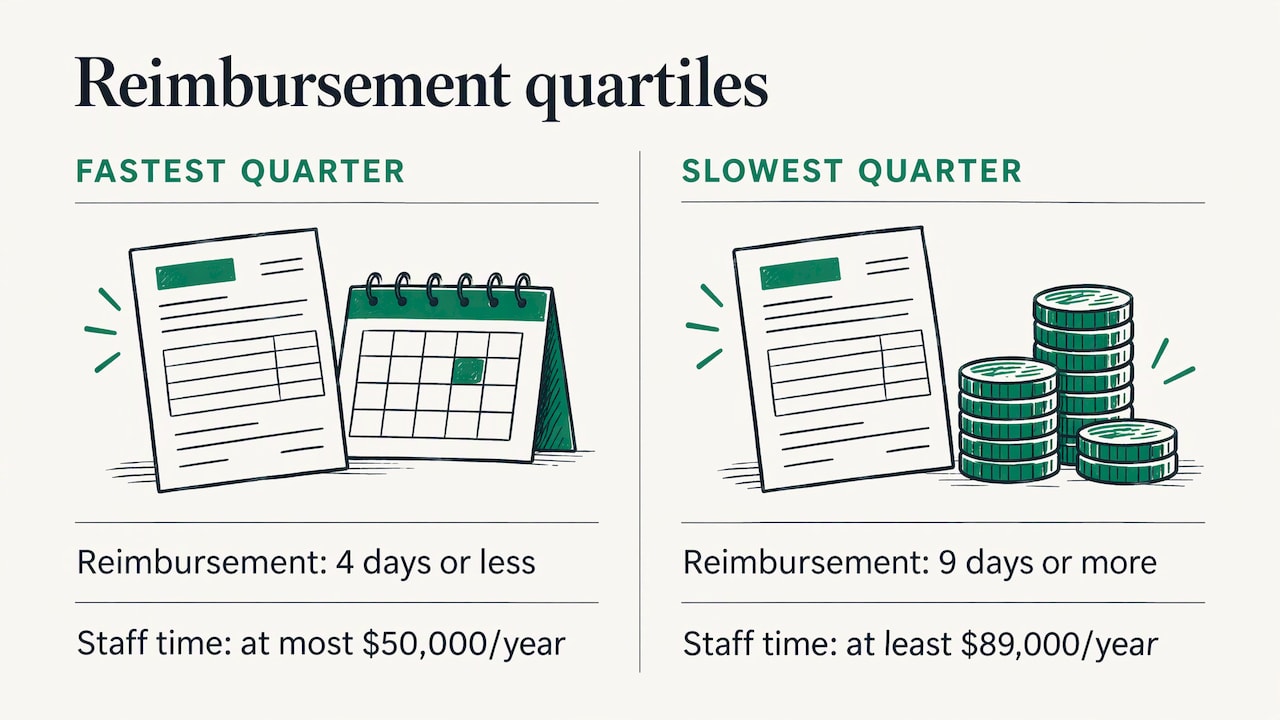
The spread inside ordinary companies is just as wide. APQC benchmarking, reported by CFO.com in 2015 across 1,069 public companies, found that the fastest quarter of companies turn around an expense reimbursement in 4 days or less, while the slowest quarter take 9 days or longer. The same research found the bottom quartile pays at least $89,000 a year in staff time for that one process, against at most $50,000 for the top quartile. Same task, very different cost, and the difference is process design.
Where delays come from
Researchers and process professionals keep finding the same handful of causes. If you recognize three or four of them in your own operation, you have found your starting list.
Handoffs
Every time work moves from one person or team to another, someone has to pick it up, understand it and get going. BPMInstitute.org describes how each handoff adds ramp-up and ramp-down time, can introduce translation errors, and lets items fall through the cracks. Fewer handoffs is one of the most dependable ways to speed a process up.
Approvals and sign-offs
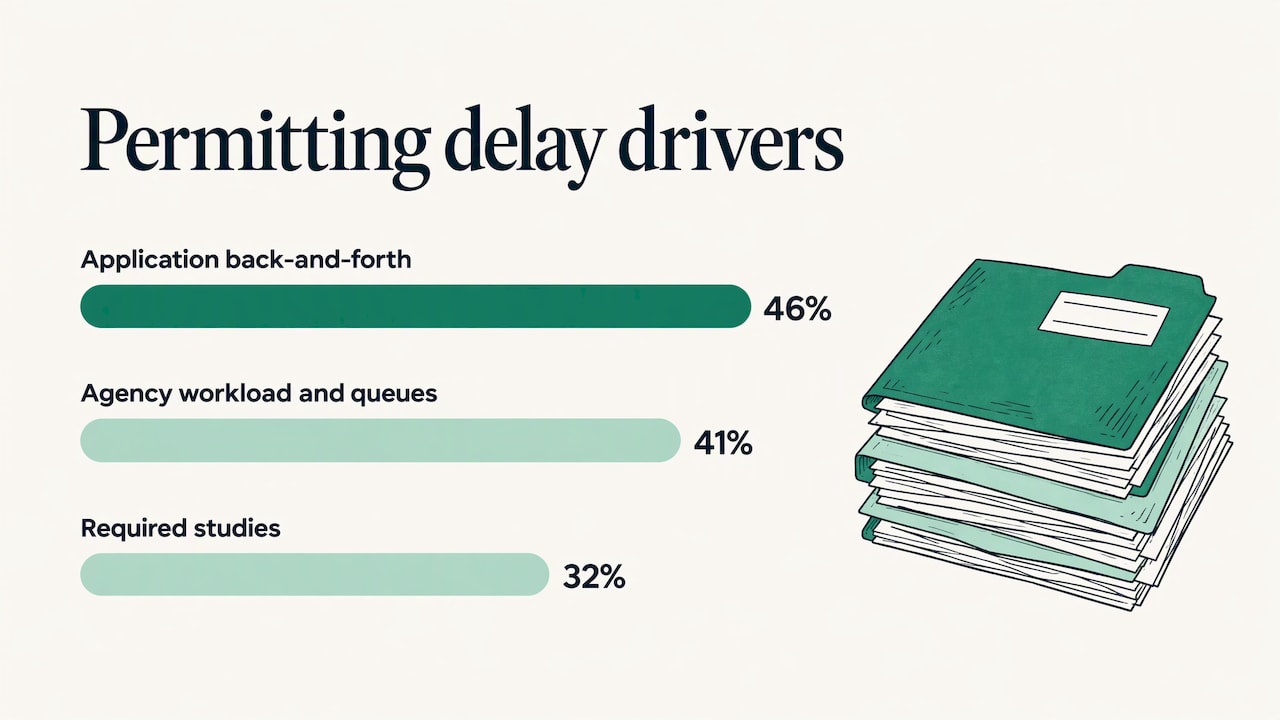
An approval is a queue with a person at the front of it. If the approver is traveling, overloaded or unsure of the criteria, everything behind them stops. A survey of U.S. manufacturers by the National Association of Manufacturers found that federal permitting delays cost the sector at least $7.9 billion a year, and that the top drivers were application back-and-forth (46%), agency workload and queues (41%) and required studies (32%). Your approvals are smaller, but the mechanics are the same: back-and-forth and queues.
Re-keying and manual data entry
Typing the same information into a second system costs time and creates errors that must be found and fixed later. In APQC accounts payable research cited by CFO.com, 58% of invoices at the median company are still keyed in manually, and bottom performers reach 77% or more. The lowest performers also needed at least 7 days to resolve an invoice error, against 3 days for the best.
Unclear ownership and missing information
AIIM groups root causes into two families. On the human side: communication breakdowns, insufficient resources, unclear next steps, staff turnover and no escalation path. On the technical side: broken or mis-routed integrations, unbalanced workloads, and incomplete information packages that nobody follows up on. That last one is common in small businesses: a form comes in half filled, and the next step waits for a reply that no one is chasing.
Too much work in progress
PMI’s work on flow lists large batches, too much work in process, undefined intake and work bouncing back and forth among the primary causes of delay. When everything is started, nothing finishes quickly.
How to find your delays in five steps
You don’t need a consulting engagement to see where work waits. You need an honest map and a few timestamps.
1. Pick one process that customers feel
Start with something that has a visible cost: onboarding a new customer, answering a lead, confirming an event guest, issuing an invoice. One process, not the whole company.
2. Map it across teams
Draw every step from the trigger (a call comes in) to the outcome (the customer is booked). APQC advises mapping end-to-end processes horizontally so you can see how work crosses functional boundaries. That view reveals delays, duplication, unclear ownership and conflicting practices that stay hidden when each team documents only its own piece.
Walk the process with the people who actually do it. The documented version and the real version are usually different.
3. Mark where work waits
For each step, record two numbers: how long the work is touched, and how long it sits before the next touch. MIT Sloan Management Review’s research describes bottlenecks as tasks that stall because an upstream task isn’t done, such as waiting on legal or compliance, or because a needed resource is unavailable. Those two patterns give you a quick sorting rule: is this step waiting on another step, or waiting on a person or tool?
The same research recommends looking at the work system as a whole rather than fixing one bottleneck at a time, because relieving one often moves the pile-up somewhere else.
4. Test every approval
BPMInstitute.org offers four questions for deciding whether an approval step earns its place:
- Is the approval required by policy or regulation?
- Are the criteria quantifiable and consistent?
- Is the approver available at least 95% of the time?
- Does the reject rate exceed 5%?
The more “no” answers you give, the more likely the step can be reduced or eliminated. An approval that rejects almost nothing and depends on one busy person is a delay with a signature on it.
5. Rank by impact and effort
Scrum Alliance’s process improvement guide suggests mapping bottlenecks, redundant steps and unclear handoffs, then prioritizing changes on an impact-versus-effort matrix, defining KPIs before you start and piloting on a small scale. Pick the fix that is high impact and low effort, set the KPI (hours from inquiry to reply, days to invoice, percent of RSVPs confirmed), and run it for a few weeks before you roll it out.
Fixes that work, in order of speed
| Fix | What it removes | Typical first target |
|---|---|---|
| Remove the step | Approvals that reject almost nothing | Low-value sign-offs |
| Run steps in parallel | Serial waiting | Checks that don’t depend on each other |
| Standardize intake | Back-and-forth, incomplete information | Forms with required fields |
| Automate the step | Re-keying, chasing, reminders | Follow-ups and status updates |
| Redesign the handoff | Dropped work, unclear ownership | Sales to operations |
BPMInstitute.org also points to serial steps that could run in parallel and inappropriate batching as common reasons a process runs slower than it has to. Both are design changes, free of any software, so do them first.
Only then look at automation. Automating a broken process just makes the broken process faster.
What is worth automating
The best candidates are steps that are repetitive, rules-based and time-sensitive: sending a reminder, asking for the missing document, confirming a booking, nudging an approver, updating a status. They are dull for a person and perfect for software.
The scale of the opportunity is large. McKinsey Global Institute estimated in 2015 that work occupying 45% of employee time across about 2,000 U.S. activities could be automated with demonstrated technology, and that for 60% of existing U.S. jobs, 30% or more of the activities could be automated. The same authors note the payoff has two parts: the return from using machines instead of labor, and the value people create with the time that is freed up.
That second part is the point for a small or mid-size team. You aren’t removing people from the process. You are removing the waiting and the chasing so they can handle the exceptions that need judgment. If you’re deciding where that line sits for new customers, our guide on what to automate and what to keep human in customer onboarding walks through it.
Communication delays: the quiet ones
Some of the most expensive delays never show up on a process map because nobody owns them: the missed call that is never returned, the guest question that waits a day, the follow-up that depends on someone remembering.
Miscommunication carries a real cost. A Versapay survey of 1,000 C-level executives, reported by PaymentsJournal in 2023, found that 73% said the invoice-to-cash process can hurt customer experience, and 85% said their company had been paid less than owed because of miscommunication in that process. Finance is one example, but the lesson holds anywhere a customer is waiting on you.
The practical fix is to make the first response automatic and the follow-up scheduled:
- Missed calls: an automated text goes out right after the call, so the caller gets an answer while they are still looking for one.
- Events: RSVPs, guest questions, polls and reminders are handled by text without a host answering each message by hand.
- Internal work: reminders and check-ins reach the person who owns the next step, with a follow-up if nothing happens.
How we approach it at GLPS Memphis
We are an IT consulting and custom software company in Memphis, and we begin with the workflow, not the tool. We learn how your operation runs, where work waits and who owns each step, then build a system that fits inside what you already do. After launch we keep supporting and improving it, because workflows change.
Three of our offers map directly to the delays above:
- Project G3 is our AI-powered assistant for tasks, reminders, check-ins and follow-ups, aimed at disorganized workflow management.
- Missed Call Recovery sends automated SMS so a missed call doesn’t turn into a lost customer.
- The Autonomous SMS Event Coordinator automates RSVPs, guest queries, polls and reminders for event hosts.
If your delays are specific to how your business runs, custom business software may be the better route, and our guide explains when it pays off.
Ready to find where your work is waiting?
Tell us the one process that costs you the most time, and we will start by understanding how it runs today. You can reach us through GLPS Memphis IT consulting, or see the full range on our services page.
Bring the map from the five steps above if you have one. If you don’t, we can build it with you.
A simple way to start this week
You can begin before any software decision:
- Choose one process and write down its trigger and its finish line.
- Note each handoff and who receives the work.
- Record how long the last ten items waited at each handoff.
- Run the four approval questions on every sign-off.
- Pick one fix, define the KPI, and pilot it for a few weeks.
The first pass usually shows that one or two steps hold most of the waiting. Those are the ones to fix first.
FAQ
What causes business process delays?
The most common causes are handoffs between people or teams, approval steps with unavailable or unclear approvers, manual re-keying of data, incomplete information that nobody follows up on, and too much work in progress at once. Unclear ownership and missing escalation paths make each of these worse.
How do I find the bottleneck in my process?
Map the process from trigger to outcome across every team involved, then record how long work is touched and how long it waits at each step. The steps with the longest waits, usually at a handoff or an approval, are your bottlenecks. Check whether the wait is for another task or for a person or tool.
Which tasks should I automate first?
Start with repetitive, rules-based, time-sensitive tasks: reminders, check-ins, follow-ups, status updates, confirmations and replies to missed calls. They follow clear rules, they are easy to measure, and a delay in any of them is felt directly by a customer or colleague.
Should I fix the process before automating it?
Yes. Remove unnecessary approvals, run independent steps in parallel and standardize intake first. Then automate what remains. Automating a step that shouldn’t exist only makes it run faster.
How can I stop missed calls from becoming lost customers?
Send an automated text right after the missed call so the caller gets an immediate response and a path to follow up. This closes the gap between the call and your callback without anyone having to remember to do it.
Sources
- GAO-20-517: Steel and Aluminum Tariffs
- Metric of the Month: Travel Reimbursement, CFO.com
- Metric of the Month: Accounts Payable Process Performance, CFO.com
- What Makes a Process Slow? BPMInstitute.org
- America on Hold, National Association of Manufacturers
- Identifying the Root Causes to the Delays and Exceptions in Your Processes, AIIM
- Using the Theory of Flow to Find Your Impediments, PMI
- How should end-to-end processes be mapped and modeled? APQC
- Improve Workflows by Managing Bottlenecks, MIT Sloan Management Review
- Process Improvement: The Complete Guide, Scrum Alliance
- How many of your daily tasks could be automated? McKinsey Global Institute
- Digitizing AR Would Address One of Executives’ Biggest Concerns, PaymentsJournal
Leave a Reply