
Appointment text reminders work when they are short, arrive at the right moment, ask for one reply, and go out without anyone typing them. The hard part is rarely the wording. It is wiring the reminder into the way your business already takes bookings, so every appointment triggers one and every reply lands somewhere your team will see it. That is the kind of workflow we build at GLPS Memphis: we start by understanding how your operation runs, then automate the follow-ups around it.
This guide covers what a reminder should say, how many to send and when, how confirmations and replies should work, what U.S. consent rules mean for you, and what to look for in automatic reminder software.
TL;DR
- Send two reminders, not one. In a randomized trial of 54,066 primary care patients, a reminder 3 days and 1 day ahead produced fewer missed visits than either single reminder.
- Every text needs five things: who is writing, what and when, where, one clear next step, and any prep.
- Make replies work: a text that asks the customer to confirm or reschedule is only useful if the answer updates your calendar and alerts your staff.
- Under federal rules, customers can opt out by any reasonable means, so honor “STOP” and similar replies and collect consent at booking.
- Automation beats manual texting once you have more than a handful of appointments a week, because a booking can trigger the whole sequence by itself.
Table of Contents
- Why a text, and why automate it
- What an appointment reminder text should say
- How many reminders to send, and when
- Confirmations, cancellations, and two-way replies
- Consent and opt-outs: what U.S. businesses should know
- What to look for in automatic appointment reminder software
- Connecting reminders to your calendar, CRM, and missed calls
- Texting guests instead of customers: event reminders
- Getting reminders running without a long project
- Where we fit
- FAQ
- Sources
Why a text, and why automate it
A missed appointment costs you the slot, the preparation, and often the revenue. A text reminder is cheap, gets read quickly, and takes the customer one tap to answer. That is why it has become the default for clinics, salons, home services, studios, and professional offices.
There are two ways to send them. You can write each text yourself, from a phone or a scheduling app, or you can connect your booking process to a system that sends them for you. Manual texting works for a few appointments a week. Past that, it fails the way every manual task fails: someone is busy, someone forgets, and the reminder that mattered most never goes out.
Automation removes the dependence on memory. A new booking creates the reminder schedule, a change to the booking updates it, and a cancellation stops it. Your staff handle the exceptions instead of the routine.
What an appointment reminder text should say
The best reminder is one a customer can read in three seconds and act on in ten. Include these five elements:
- Who. Your business name and the customer’s first name, so the text does not look like spam.
- What and when. The service and a fully spelled-out date and time, such as “Tuesday, March 3 at 2 p.m.” Avoid “tomorrow” in a message that might be read two days later.
- Where. The street address, suite number, or video link.
- One next step. Reply C to confirm, reply R to reschedule, or tap a link. Offer one action, not three.
- Prep, if it matters. Arrive 10 minutes early, bring your insurance card, no food before the visit, or park in the rear lot.
Here is a template you can adapt:
Hi Maria, this is Riverside Dental. You’re booked for a cleaning on Tuesday, March 3 at 2 p.m. at 410 Main St, Suite 2. Reply C to confirm or R to reschedule. Reply STOP to opt out.
That is under 200 characters and covers everything. Notice what is missing: no long greeting, no marketing pitch, no extra links. A reminder that also tries to sell something loses its clarity and, as the consent section below explains, can change which rules apply to it.
Writing for different businesses
The structure stays the same, but the details shift:
- Service businesses (plumbing, HVAC, cleaning) benefit from a time window and a technician name, plus a note about access to the property.
- Professional offices (accounting, legal, consulting) should include the meeting format and any documents to bring.
- Event hosts have a different job: instead of one appointment per person, they need RSVPs, headcounts, and guest questions answered at volume. We cover that further down.
How many reminders to send, and when
The strongest evidence on timing comes from health care, where no-shows have been studied at scale. Two findings are useful for any business that books appointments.
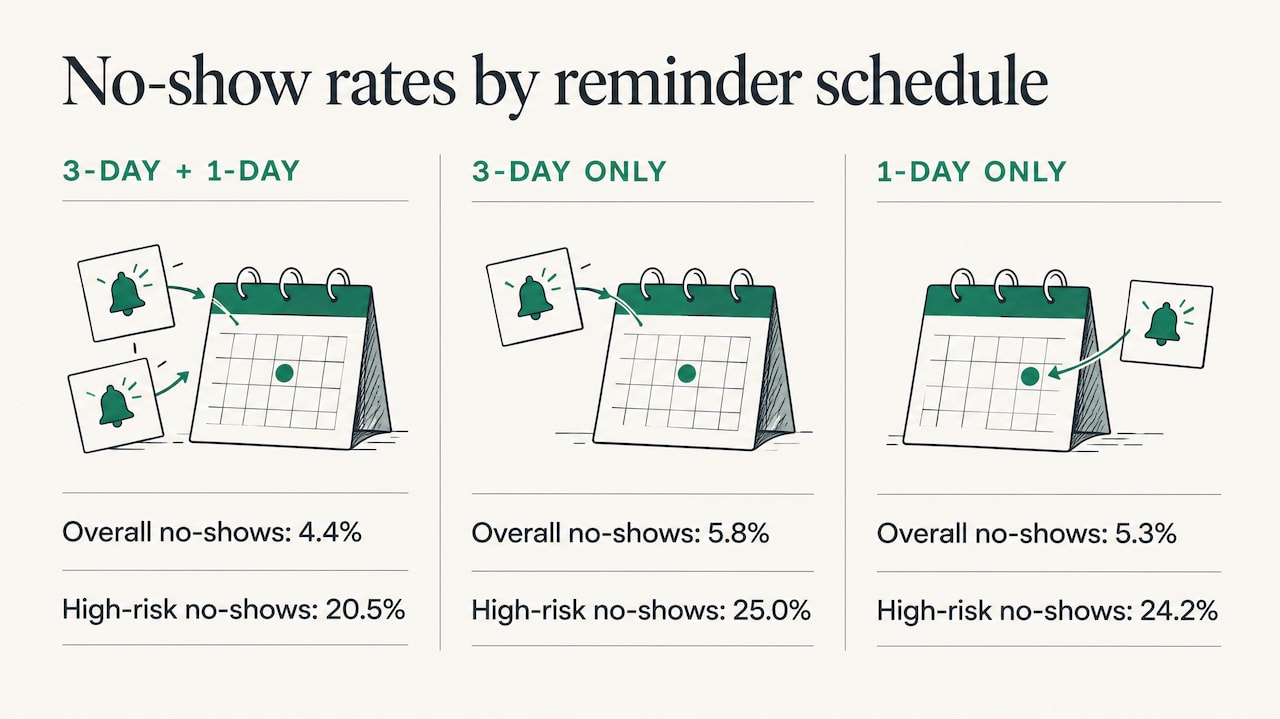
Two reminders beat one. A randomized trial of 54,066 primary care patients compared reminder schedules. Patients who received reminders both 3 days and 1 day before the visit missed 4.4% of appointments, against 5.8% for a 3-day-only reminder and 5.3% for a 1-day-only reminder. Among high-risk patients, two reminders brought no-shows down to 20.5% from 25.0% and 24.2%, and visit satisfaction did not drop.
The extra reminder pays most where no-shows are most likely. A Kaiser Permanente Washington study covering 125,076 primary-care visits and 33,593 mental-health visits tested an added text 3 business days ahead for high-risk visits. It reduced primary-care no-shows by 7% and mental-health no-shows by 11%, and cut same-day cancellations in primary care by 6%.
These are clinical settings, so treat the exact percentages as indicative rather than a promise for your trade. The pattern is what transfers: more than one touchpoint helps, and a longer lead time gives the customer room to reschedule instead of simply not showing up.
A practical schedule
For most appointment-based businesses, this sequence is a sound default:
| Timing | Purpose | Message type |
|---|---|---|
| At booking | Confirm the details were captured | Confirmation with date, place, and opt-out line |
| 3 days before | Give time to reschedule | Reminder with a confirm or reschedule reply |
| 1 day before | Final check and prep | Short reminder, plus prep instructions |
| Morning of (optional) | Reduce same-day misses for short-notice services | One-line reminder with address or link |
For appointments booked weeks ahead, add an early reminder a week out. For same-day or next-day bookings, collapse the sequence: a confirmation at booking and one reminder a few hours before.
Keep sends within reasonable hours. Most businesses avoid texting before 8 a.m. or after 8 p.m. in the customer’s time zone. It is a courtesy that also reduces opt-outs.
Confirmations, cancellations, and two-way replies
A reminder that only broadcasts is half a system. The value comes when the customer answers and something happens.
A complete two-way flow handles four outcomes:
- Confirm. The reply marks the appointment confirmed in your calendar or customer record.
- Reschedule. The reply triggers a link to open times or alerts a staff member to call back.
- Cancel. The slot reopens, ideally with a prompt to offer it to someone on a waitlist.
- Question or unrecognized reply. A person sees it quickly. “Can I bring my daughter?” should never vanish into an unread inbox.
The last case is where most do-it-yourself setups break. Keywords like C and R are easy to automate. Free-form replies need a routing rule: who gets notified, how fast, and what happens after hours. Deciding that is a workflow question, not a software setting, and it is the reason we begin every engagement by mapping how your team already handles bookings and phone calls.
This is also why confirmations matter even for customers who never reply. A non-reply is a signal. A customer who ignored two reminders is your highest-risk appointment, and your staff can make one personal call instead of finding out at the empty chair.
Consent and opt-outs: what U.S. businesses should know
Text reminders to customers fall under the Telephone Consumer Protection Act (TCPA), the federal law governing automated calls and texts, and under carrier messaging rules. This section is a practical overview, not legal advice. If your messages touch health information, financial services, or marketing, confirm your setup with your attorney or compliance adviser.
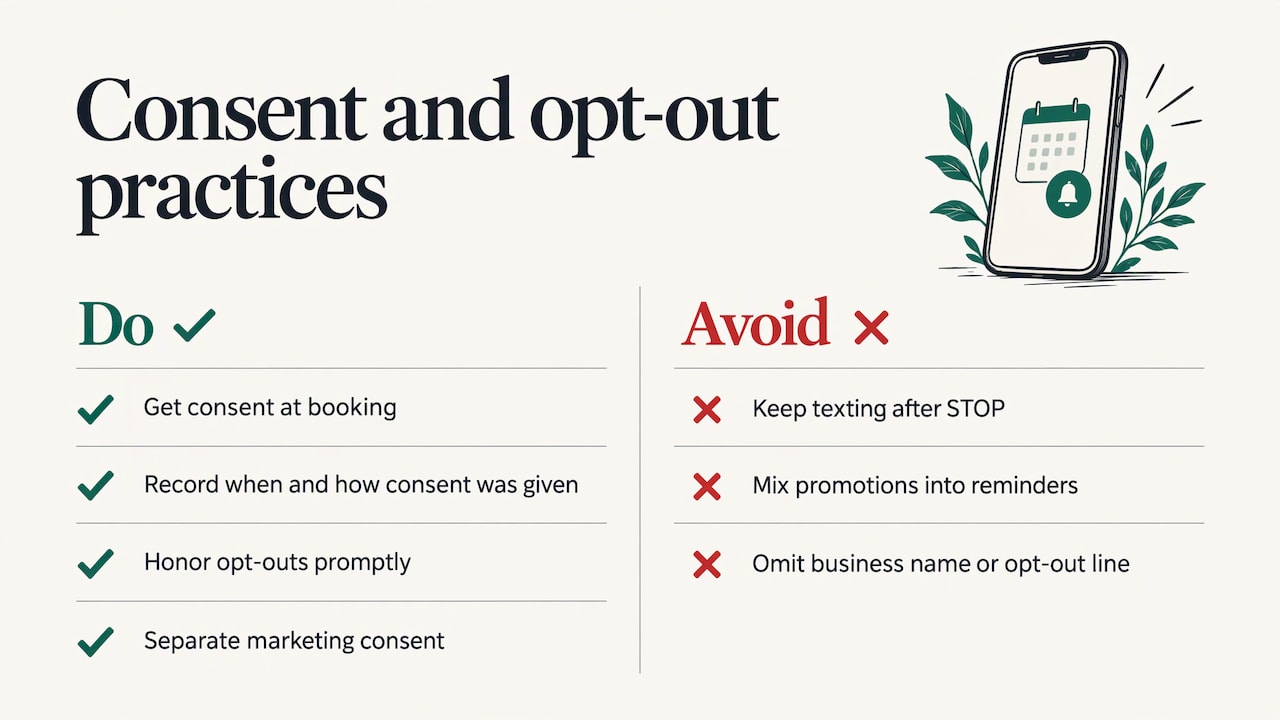
Get consent at booking. Add a clear line to your online booking form, intake paperwork, or phone script saying the customer agrees to receive appointment texts, how often, and that they can reply STOP at any time. Keep a record of when and how each customer agreed. Our SMS consent page shows how we describe consent for our own messaging.
Honor opt-outs fast and in any reasonable form. The FCC adopted rules in 2024 that codify the right to revoke consent through any reasonable means. In practice, that means a customer who replies “STOP,” “quit,” “unsubscribe,” or something similarly clear must stop receiving texts. Your system should recognize those words automatically and suppress future sends without a staff member having to act.
Keep reminders informational. A message that confirms a booking is different in kind from a promotion. If you want to send offers, get separate marketing consent and send those messages separately.
Include your business name and an opt-out line in the first message of a sequence, and keep your sender identity consistent so customers recognize you.
What to look for in automatic appointment reminder software
Whether you buy a packaged tool or have a system built, evaluate it against what you actually do each day:
- Triggered by the booking itself. The reminder schedule should start from your calendar, scheduling tool, or customer records, not from a spreadsheet someone updates.
- Two-way messaging. Customers can reply, and replies change the appointment record.
- Multiple reminders with different timing. You need at least the 3-day and 1-day pattern, adjustable per appointment type.
- Opt-out handling built in. STOP and similar replies are processed automatically and logged.
- Staff alerts. Anything the system cannot resolve reaches a person, with context.
- Integration with the tools you already use. A reminder system that needs double entry will be abandoned within a month. Our guide to business software integration covers how small teams connect systems without rebuilding everything.
- Room to change. Your appointment types, hours, and policies will evolve. The system should evolve with them.
That last point is where off-the-shelf tools tend to get stretched. When your process has a quirk, such as deposits for certain services, different prep for different staff, or a waitlist, a generic template forces you to bend your process around it. A tailored build does the opposite. If you are weighing the two, custom business software explains when the investment pays off.
Connecting reminders to your calendar, CRM, and missed calls
Automation works through a simple chain: a booking is created, the system reads the date, contact number, and service, queues the reminders, and logs every reply against the customer record. When staff reschedule in the calendar, the queued messages update instead of firing at the old time.
The same logic covers the front end of the process. Many appointments are lost before they are ever booked, because a customer called, reached voicemail, and called the next business on the list. Our Missed Call Recovery service sends an automated text to callers you could not answer, so the conversation continues instead of ending. If you want the mechanics, how missed call text back works walks through the setup.
Think of the full customer path as one sequence: a missed call becomes a text, the text becomes a booking, the booking becomes reminders, and the reminders become a confirmed visit. Each handoff is a place where a manual process leaks. Our workflow automation examples show how small and mid-size businesses link these steps, and our guide to automating administrative tasks covers the routine work around them.
Texting guests instead of customers: event reminders
If you host events, you face a different version of the same problem. You are not reminding one person about one slot. You are collecting RSVPs, answering the same questions about parking and start times, running quick polls, and nudging people who have not replied.
Our Autonomous SMS Event Coordinator is built for that job. It automates guest interactions including RSVPs, questions, polls, and reminders, so the host is not answering the same text fifty times. You can read more on the SMS Event Coordinator page.
Getting reminders running without a long project
Whatever route you take, this order keeps the work small:
- List your appointment types and how far ahead each is usually booked.
- Write one template per type using the five elements above.
- Choose the schedule: a 3-day and 1-day pair is the proven starting point.
- Decide who handles replies that are not a simple confirm, reschedule, or cancel.
- Add consent language to the booking path and confirm opt-outs are processed automatically.
- Track no-show rate for a month before and after, by appointment type, then adjust the timing.
Step 4 is the one that decides whether the system feels helpful or frustrating to customers, and it is the step where knowing your own operation matters more than any feature list.
Where we fit
We are an IT consulting and custom software company in Memphis, Tennessee. We build practical automation that fits into existing operations rather than replacing them. We start by understanding your workflow, build around it, and keep improving the system after launch.
Project G3, our AI-powered assistant, handles tasks, reminders, check-ins, and follow-ups, which makes it a natural fit when reminders are one part of a larger follow-up routine. For businesses that lose customers at the phone, Missed Call Recovery closes that gap, and event hosts can use the SMS Event Coordinator. If you are not sure which fits, our services overview is the place to start, or talk to us about a reminder workflow built around your calendar.
FAQ
How far in advance should I send an appointment text reminder?
Two reminders, around 3 days and 1 day before, performed best in a trial of 54,066 primary care patients, with a no-show rate of 4.4% against 5.8% and 5.3% for single reminders. For appointments booked weeks out, add one a week ahead. For same-day bookings, send a confirmation immediately and one reminder a few hours before.
Are automated appointment reminders legal?
Yes, when you have the customer’s consent, keep the messages informational, and honor opt-outs. Customers may revoke consent by any reasonable means, so your system should treat STOP and similar replies as final. Because rules differ for health care, finance, and marketing messages, have your attorney or compliance adviser review your setup.
What should an automated appointment confirmation include?
Include your business name, the customer’s first name, the service, the full date and time, the location or video link, one reply option such as C to confirm, and an opt-out line. Add prep instructions only if the customer needs them.
Can I schedule reminder texts from my phone instead?
You can, and it works for a few appointments a week. The limits show up with volume: each text depends on someone remembering, replies are not logged against the customer record, and a rescheduled appointment can leave a stale reminder in the queue. An automated system triggers from the booking and keeps everything in sync.
Sources
- Optimizing number and timing of appointment reminders: a randomized trial (PubMed)
- Pragmatic Randomized Study of Targeted Text Message Reminders (PMC)
- FCC fact sheet on TCPA consent revocation rules, January 2024
Leave a Reply