
SMS marketing automation means a text goes out on its own when a customer does something: misses a call, RSVPs, signs up, books or goes quiet. The businesses that get the most from it start with one workflow tied to a real operational problem, such as calls that go unanswered or guests who never confirm, and build the system around how their team already works. We build these workflows for businesses and event hosts, and this guide covers what to automate first, what to require from any setup, and the US consent rules that apply.
TL;DR
- SMS automation uses a trigger, a rule and a message. An action by the customer sends a pre-written text without anyone typing it.
- Start with the workflows that fix a leak: missed-call follow-up, event RSVPs and reminders, appointment confirmations and follow-ups.
- Choose a setup for reply handling, consent records, STOP handling and fit with your existing tools, not for the number of features.
- In the US, automated marketing texts need the recipient’s consent, and a STOP reply has to be honored. Keep proof of every opt-in.
- Custom workflows built around your operation avoid the clutter of a generic tool you only half use.
Table of Contents
- What SMS marketing automation is
- Does SMS marketing still work?
- Workflows worth automating first
- A simple example: a three-text appointment flow
- What to require from an SMS automation setup
- Ready-made tool or custom build?
- US consent rules for automated texts
- Common mistakes
- Where we fit
- FAQ
- Sources
What SMS marketing automation is
A one-off text blast is a campaign: you pick a day, write a message and send it to a list. Automation is different. You define the logic once, and it runs continuously in the background. The structure is always the same: a trigger (what the customer did), a rule (what the system should do about it) and a message (what the customer receives).
Mailchimp’s overview of SMS marketing automation is not linked here because it comes from a platform vendor; the useful point from the market is simply that workflows are driven by customer behavior rather than by a calendar date, and the text often arrives within seconds of the action.
Three kinds of workflow cover most needs:
- Triggered messages. Something happens (a missed call, a form submission, an RSVP) and a text follows.
- Scheduled sequences. A series of messages at set intervals, such as a confirmation, a reminder the day before and a nudge on the day.
- Broadcasts. One message to many people at a set time, not tied to an individual’s action.
Most of the value sits in the first two, because they respond to a specific person at the moment it matters to them.
Does SMS marketing still work?
The channel is useful when the audience has agreed to hear from you and the message is useful to them. eMarketer’s August 2026 FAQ, citing the Vibes 2026 Mobile Consumer Insights Report, says 78% of consumers have bought something because of a brand’s text messages, including 65% within the past year. The same piece explains why: texts are read quickly and reach people who already opted in, and utility messages such as reminders and reorder alerts tend to outperform pure promotion.
That last point shapes how a small or mid-sized business should use automation. You do not need a discount blast to benefit. A reminder, a confirmation or a prompt reply to a missed call serves the customer and moves the business forward.
Workflows worth automating first
Pick the workflow by the problem it solves, not by the feature list of a tool. Here are the ones that tend to matter most to service businesses and event hosts.
Missed-call follow-up
A customer who calls and reaches voicemail often moves on to the next business. An automated text sent right after the missed call tells them you saw it and gives them an easy way to continue the conversation. Our Missed Call Recovery service is automated SMS for exactly this situation, and our guide to how missed call text back works and how to set it up walks through the flow.
Event RSVPs, questions, polls and reminders
Event hosts spend hours answering the same questions by text: where do I park, what time does it start, can I bring a guest. Our Autonomous SMS Event Coordinator automates RSVPs, guest queries, polls and reminders so the host is not typing the same reply a hundred times. The page also covers headcounts and guest follow-ups.
Appointment confirmations and reminders
A confirmation when someone books, a reminder a day ahead and a short nudge on the day are the standard pattern. Add a reschedule path: if the person replies that they cannot make it, offer the next available slots instead of leaving an empty chair.
Lead follow-up
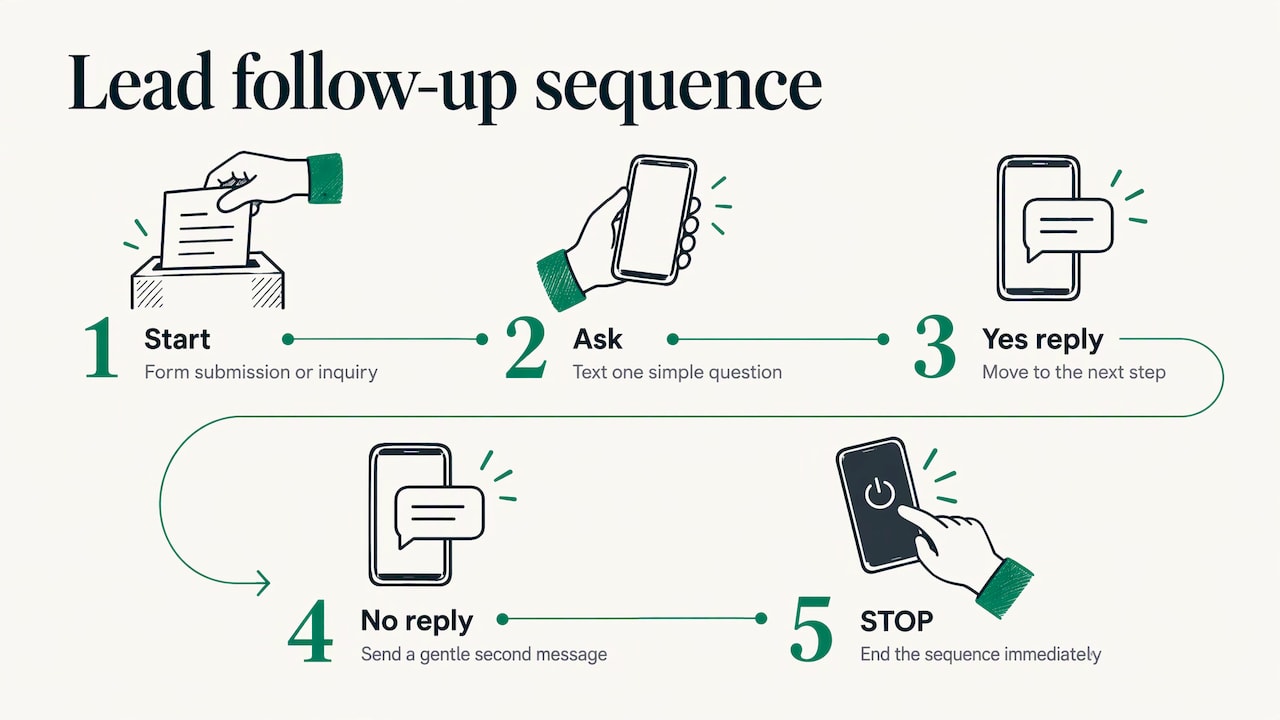
After a form submission or an inquiry, a quick text asking one simple question keeps the conversation warm. Branch the sequence on the reply: a yes moves to the next step, silence triggers a gentle second message and STOP ends it immediately.
Internal tasks, check-ins and reminders
Automation is not only for customers. Our Project G3 is an AI-powered assistant for tasks, reminders, check-ins and follow-ups, aimed at the disorganized workflow management that makes follow-ups slip in the first place. You can read more on the Project G3 page.
A simple example: a three-text appointment flow
Take a service business with a front desk that is often busy. A workable flow looks like this:
| Step | Trigger | Message purpose |
|---|---|---|
| 1 | Booking is made | Confirm the time and say who is texting |
| 2 | 24 hours before | Remind, with a simple reply to confirm or reschedule |
| 3 | Call is missed at any point | Acknowledge the call and invite a reply |
| 4 | Customer replies with a question | Stop the automation and hand over to a person |
The fourth row is the one most setups skip. When a customer answers an automated message, the reply is a signal that they want a person. The flow should stop sending and put that conversation in front of someone on your team.
What to require from an SMS automation setup
Whether you use a ready-made tool or have one built, judge it against the same short list.
Triggers that match your real events. Time-based, action-based and behavior-based triggers should cover what actually happens in your business: a missed call, a booking, an RSVP, a status change in your records.
Personalization. Merge fields (name, time, location) make a message read as written for one person, which matters because many consumers distrust generic business texts.
Two-way messaging with human handoff. Replies need somewhere to go. That means a shared inbox or a clear route to the right staff member, and a rule that pauses automation once a person replies.
Consent and opt-out handling. Stored proof of each opt-in, automatic STOP handling and sender identification in every message. More on this below.
Integration with what you already use. A tool that cannot see your calendar, CRM or phone system forces your team to copy data by hand, which defeats the point. This is the reason our approach starts with your existing workflow before anything is built, and why we keep supporting and improving the system after launch.
Reporting you will actually read. Replies, confirmations and opt-outs tell you whether the workflow helps. Track a few numbers tied to the original problem, not a dashboard of everything.
Handling the replies your automation creates
Automation increases inbound conversation, and someone has to answer it. If those replies land with a team that already juggles phones, a good business phone system with call queues and ring groups keeps the voice side organized, so a customer who texts and then calls reaches a person quickly.
Ready-made tool or custom build?
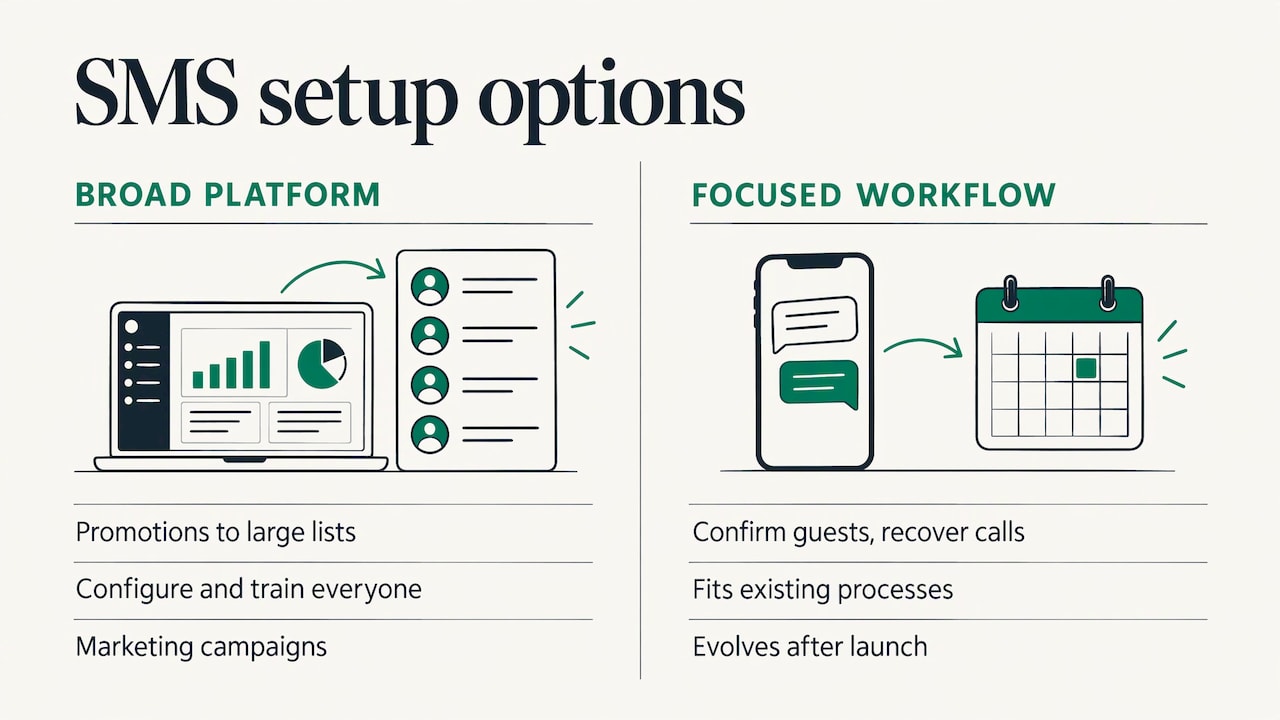
Generic platforms are built for marketers who send promotions to large lists. If that is your goal, you will compare many of them. But many operational needs are narrower: confirm guests, answer common questions, recover missed calls, remind staff. For those, a focused workflow that fits your processes is often simpler than configuring a broad platform and training everyone on it.
That is the idea behind our work. We focus on practical technology that fits into existing operations, with the aim of minimizing complexity. We learn how your team works before building anything, and the solution keeps evolving after launch. If your needs go beyond text messaging, our page on custom business software and when it pays off explains where a tailored system makes sense.
US consent rules for automated texts
This section is general information, not legal advice. For a campaign that is large, regulated or unusual, talk to an attorney who handles telecommunications or consumer-protection law.
In the US, automated marketing texts fall under the Telephone Consumer Protection Act (TCPA), enforced through rules from the Federal Communications Commission (FCC). The practical baseline for any business:
- Get clear consent before marketing texts. Tell people what they are signing up for, who is sending, and roughly how often.
- Keep a record. Store when, where and how each person opted in.
- Honor STOP right away. An opt-out must apply to the whole sequence, not just the next message.
- Do not mix purposes. A person who agreed to appointment reminders has not agreed to promotions.
- Identify yourself. Every message should make clear who it is from.
Two recent developments are worth knowing. First, in January 2025 the Eleventh Circuit court vacated the FCC’s “one-to-one” consent requirement, which would have required consent to name a single seller. Second, the FCC’s rule on revoking consent was partly delayed: the part covering revocation across unrelated messages was pushed to April 11, 2026. Since then the details may have moved again, so check the FCC’s own TCPA pages for the current text before you launch. Building STOP handling that applies across all your messages is the safe design either way.
Our own opt-in language is public on our SMS consent page, which is a useful model for how a business explains what subscribers agree to.
Common mistakes
- Automating before the process works. If nobody knows who answers a reply, the text only creates more unanswered messages.
- Sending too often. Message frequency is a leading reason people opt out, so fewer, more useful messages beat more messages.
- Treating all contacts the same. Separate people who opted in for reminders from those who opted in for offers.
- Skipping the human handoff. A reply that gets no answer is worse than no automated text at all.
- Writing like a billboard. Plain, polite, specific messages read better than slang or heavy emoji.
Where we fit
If your problem is calls that go unanswered, guests who need constant updates, or follow-ups that slip, we can build the workflow around your operation. We work as IT consultants and software builders: we learn how you operate, build the automation that fits and keep improving it after it goes live. See the Services page for the range, or start with the offer closest to your need.
For event hosts, the Autonomous SMS Event Coordinator is the place to start. For businesses losing calls, see Missed Call Recovery. For broader workflow problems, reach us through GLPS Memphis.
FAQ
What is the difference between SMS marketing and SMS automation?
SMS marketing is the broad practice of using text messages to reach customers. Automation is how you run it: a trigger, a rule and a message set up once so texts go out on their own when a customer acts. Most useful programs rely mostly on automation, with occasional broadcasts.
Can I automate texts to customers?
Yes, as long as the recipients have given the consent that fits the kind of message. Marketing messages need clear opt-in, and every sequence must stop when someone replies STOP. Keep a record of each opt-in.
What should I automate first?
Start with the workflow that fixes your most visible leak. For many businesses that is missed-call follow-up. For event hosts it is RSVPs and reminders. Get one working, with a clear route for replies, before adding more.
Do I need a dedicated SMS platform?
Not always. If you send large promotional campaigns, a marketing platform may fit. If your needs are operational, such as confirmations, guest questions, reminders and missed calls, a workflow built around your existing processes can be simpler to run. We can help you work out which describes you.
Sources
- eMarketer: FAQ on SMS marketing, opt-in drivers and purchase impact
- Kelley Drye: Eleventh Circuit vacates TCPA one-to-one consent rule
- America’s Credit Unions: The Revocation of Consent Rule
Leave a Reply