Author: glpsadmin

  • Missed Call Text Back: How It Works and How to Set It Up

    Missed Call Text Back: How It Works and How to Set It Up

    A missed call text back sends the caller an automatic text message within moments of a call you could not answer, so the conversation continues by SMS instead of ending at voicemail. Set up well, it gives every missed caller a reply, a clear next step and a record in your workflow. Our Missed Call Recovery service does this as automated SMS built around how your business already handles calls and follow-ups.

    This guide covers what the feature does, when it pays off, how to set it up step by step, what the message should say, how to choose software, and the US texting rules to respect.

    Glpsmemphis
    glpsmemphis.com
    Keep Missed Call Conversations Moving
    GLPS Memphis builds automated SMS around your existing call and follow-up workflows, helping businesses continue conversations after missed calls.

    Visit

    TL;DR

    • A missed call text back is an automatic SMS sent to a caller when their call goes unanswered, so the lead gets a reply while it is still warm.
    • It matters most after hours, during busy stretches and for any business where a call is often the first step toward a booking or a sale.
    • A good setup has four parts: a call trigger, a short message with one easy question, reply routing to a real person, and a follow-up rule.
    • Keep the text a direct reply to someone who just called you, include a way to opt out and keep records of consent.
    • Choose a system that fits your existing workflow instead of forcing you to rebuild it around the tool.

    Table of Contents

    What a missed call text back actually is

    A missed call text back is a feature that watches your business phone line. When an inbound call goes unanswered, whether you were busy, closed or on another line, it sends a short SMS to the number that called. The text acknowledges the call and invites the person to reply with what they need.

    Three things make it different from voicemail:

    1. The caller does not have to do anything hard. Leaving a voicemail means waiting for a beep and talking to nobody. Replying to a text takes a few seconds and can happen anywhere.
    2. The reply starts a written thread. You can answer when you are free, and the history sits in one place.
    3. It works while you are away. The message goes out at 9 p.m. or during a job site visit just as it does at 10 a.m.

    People also search for this as “automatic text after missed call,” “text back software for missed calls” or “automated texts for missed calls.” These are the same idea: software that turns a missed inbound call into an outbound text conversation.

    Why a missed call is worth answering by text

    A caller who reaches voicemail has usually already decided what to do next. Many will try someone else. A text that arrives right away puts you back in the conversation before that decision is made.

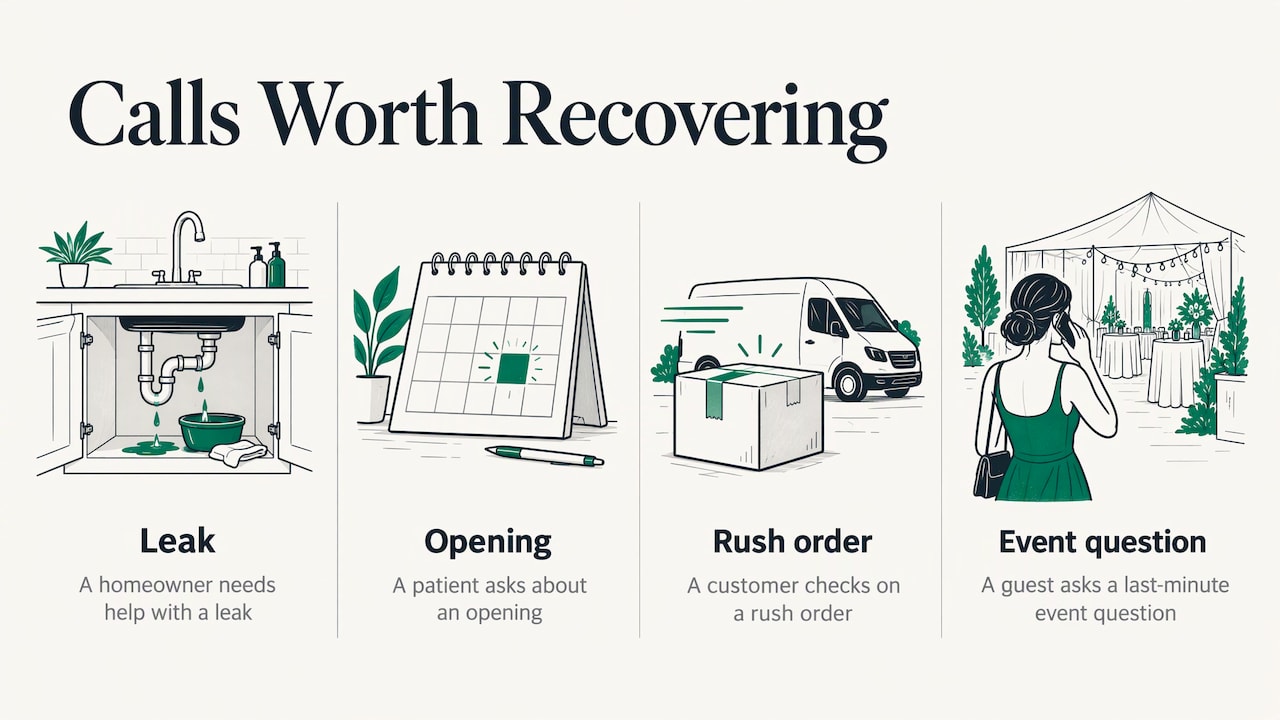
    The calls most worth recovering share a pattern: the caller wants something time-sensitive and has little reason to wait. Think of a homeowner with a leak, a patient asking about an opening, a customer checking whether you can take a rush order, or a guest asking an event host a last-minute question. Each of these is a person ready to act, and each is lost if the first answer is silence.

    There is also a plain operational reason. Most small teams cannot staff a phone every minute. A text back does not replace anyone. It covers the gaps between the moments your team can pick up.
    Why a missed call is worth answering by text

    Situations where it pays off most

    After-hours calls

    Calls that arrive in the evening, on weekends or over holidays are the clearest case. Nobody is available, and the caller expects nothing until morning. An automatic text can confirm you received the call, tell them when you will respond and ask a first question so the morning conversation starts further along.

    Busy periods

    A front desk, a service crew or a kitchen can be fully occupied for hours. During those stretches, calls ring out even though the business is open. Text back catches them without anyone stopping work.

    Appointment and quote-driven businesses

    Where a call leads to a booking, an estimate or a consultation, each missed call is a missed opportunity to schedule. A reply that offers a time or asks for a few details moves the lead toward an appointment.

    Event hosts

    Hosts and organizers field a steady stream of questions about times, locations, plus-ones and RSVPs. Missed calls from guests are a normal part of the week. For this case we built the Autonomous SMS Event Coordinator, which automates RSVPs, queries, polls and reminders by text, so guests get answers without the host being on the phone.

    How to set up a missed call text back system

    The mechanics differ by phone system, but the sequence is the same. Work through it in order, because the common failures come from skipping a step.

    Step 1: Decide which calls trigger a text

    Start by defining “missed.” The usual triggers are calls that ring out, calls sent to voicemail, calls received outside business hours and calls abandoned while on hold. Decide whether each should produce a text.

    Where it goes wrong: texting everyone, including existing customers who call a direct line, vendors, and numbers that cannot receive texts (landlines and some office lines). Decide up front which numbers to exclude, and make sure the system skips numbers that are not mobile.

    Step 2: Choose the sending number

    The text should come from a number the caller recognizes and can reply to. Usually that is your main business line, texting-enabled, so a reply lands in the same place as the call did. A random or changing number makes the message look like spam and breaks the thread when the caller replies later.

    In the US, business texting over standard 10-digit numbers generally has to be registered with carriers so messages are not filtered. Registration involves identifying your business and describing what you will send, and it can take time, so start it before you plan to launch.

    Step 3: Write the message

    Keep it to a few sentences: who you are, that you saw the call, and one simple question. The next section has examples.

    Step 4: Route the replies

    This is where most setups quietly fail. The text goes out, the caller answers, and the reply lands in an inbox nobody checks. Decide who owns replies, how quickly they should be answered, and what happens outside business hours. A caller who replies and hears nothing is worse off than one who never got a text.

    Good routing answers three questions: who sees the reply, how are they notified, and what is the fallback if they do not respond?

    Step 5: Add a follow-up rule

    Some callers will not reply to the first text. Decide whether you send one gentle reminder, and when. One follow-up is reasonable. A string of them reads as pressure and invites opt-outs.

    Step 6: Connect it to the rest of your workflow

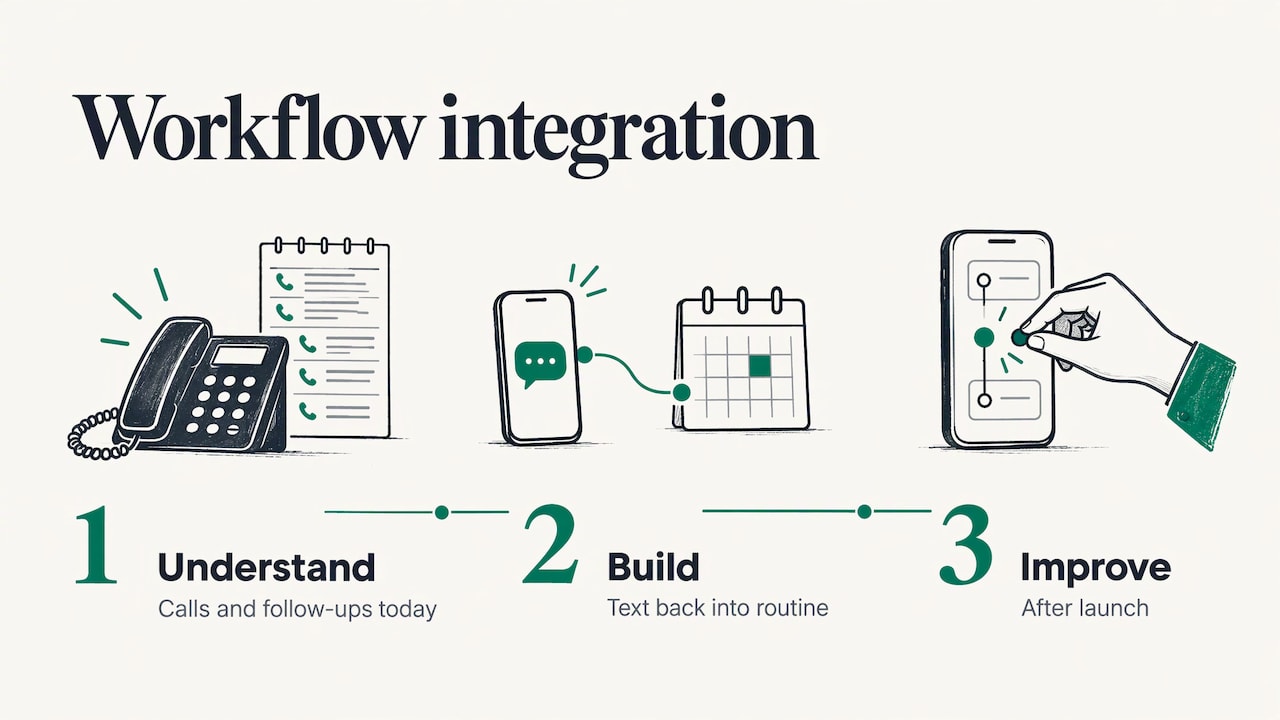
    A text thread that lives alone becomes one more thing to check. The leads it produces should flow into wherever you already track customers, whether that is a calendar, a spreadsheet or a CRM (customer relationship management software). This is the part we spend the most time on with clients: we begin by understanding how your team handles calls and follow-ups today, then build the text back to fit that routine, and we keep improving it after launch. Our Project G3 assistant handles tasks, reminders, check-ins and follow-ups for teams that want the same kind of automation beyond the phone.
    Step 6: Connect it to the rest of your workflow

    Step 7: Test it from the caller’s side

    Before launch, call your own line from a mobile phone and let it ring out. Check that the text arrives quickly, reads well on a small screen, and that your reply path works end to end. Repeat after hours.

    What the text should say

    The message has one job: get a reply. Every extra sentence lowers the chance of one.

    A good message:

    • names your business, so the caller knows who is texting;
    • acknowledges the missed call without a long apology;
    • asks one easy question the caller can answer in a few words;
    • says when a person will follow up if it is after hours;
    • makes opting out simple.

    Example for a general service business:

    Hi, this is Riverside Plumbing. Sorry we missed your call. What can we help you with? We’ll reply as soon as we can. Reply STOP to opt out.

    Example for an after-hours call:

    Thanks for calling Harbor Dental. Our office is closed, but we’ll text you back first thing tomorrow. Is this about a new appointment or an existing one? Reply STOP to opt out.

    Example for an event host:

    Hi, this is the Carter wedding team. We missed your call. Are you asking about the RSVP, directions or the schedule? Reply with a word and we’ll send details. Reply STOP to opt out.

    (The business names above are invented examples.)

    A few habits make these work better:

    • Ask a narrow question. “What can we help you with?” invites a paragraph. “New appointment or existing?” invites one word.
    • Sound like a person. Short, plain sentences read as a real reply, not a broadcast.
    • Do not sell in the first message. The caller asked for help. Offer it before anything else.
    • Set an honest expectation. If nobody will answer until morning, say so.

    Texting someone who just called you is a direct reply to their own contact, which is the lowest-risk kind of business text. Even so, texting in the US is governed by the Telephone Consumer Protection Act (TCPA), a federal law that restricts automated calls and texts and lets consumers bring claims, so it pays to build the system carefully.

    The rules have been moving. A professional summary of recent TCPA developments reports that in March 2026 the Fifth Circuit held the written-consent regulation invalid, leaving “prior express consent” undefined, and that on July 14, 2026 the Seventh Circuit held that “telephone call” in the TCPA’s private cause of action under § 227©(5) does not include text messages. Courts differ by region and the law keeps changing, so treat these as signs of an unsettled area, not a reason to relax your practices.

    Practical habits that serve you under any version of the rules:

    • Keep the text a reply. Send the message in response to a call the person placed to you, about the reason they called.
    • Make opting out easy. Honor STOP immediately and do not text that number again.
    • Keep records. Store when the call came in, what was sent and any consent or opt-out.
    • Send at sensible hours. Avoid late-night messages unless the person is clearly expecting a reply.
    • Do not turn it into marketing. A promotional blast to people who only called once is a different matter from a reply, and carries different consent requirements.
    • Publish a clear consent policy. Ours is on our SMS consent page.

    For questions about your own situation, such as industries with extra rules (healthcare, financial services), talk to your attorney. A lawyer should review the final message flow before launch.

    What to look for in text back software

    Whether you buy a tool, hire a consultant or commission something custom, judge it on these points.

    What to check Why it matters
    Trigger options You need control over which missed calls produce a text: after-hours, ring-outs, abandoned calls.
    Mobile-only sending Texts to landlines fail and waste effort.
    Reply handling Replies must reach a named person quickly, with a fallback.
    Opt-out handling STOP must work automatically and be remembered.
    Carrier registration support Unregistered business texting risks filtering.
    Fit with your workflow The tool should feed your calendar, CRM or task list, not create a second inbox.
    Reporting You should see how many calls were missed, how many texts went out and how many replies became bookings.
    Ongoing support Your hours, services and wording change, and the system has to change with them.

    The last two rows are where off-the-shelf options tend to be thin. A tool that texts everyone the same line and stops there recovers some calls. A system that understands your hours, your staff and your follow-up routine recovers more.

    Metrics worth tracking

    You do not need a dashboard full of numbers. Track a few and review them monthly:

    • Missed calls per week, split by during-hours and after-hours.
    • Reply rate: the share of texts that get an answer.
    • Time to first human response after a reply.
    • Bookings or quotes that began as a missed call.
    • Opt-out rate: if it climbs, your message or timing needs work.

    A low reply rate usually points to the message: too long, too vague or from an unfamiliar number. A high reply rate with few bookings usually points to slow human follow-up.

    Common mistakes

    • No one owns the replies. The text works, then the thread sits unanswered.
    • Too many messages. One text and at most one reminder is enough.
    • Texting non-mobile numbers. Filter them out.
    • A cold, generic message. Name the business and ask something specific.
    • Ignoring the rest of the workflow. A missed call text back is the first move. What happens after the caller replies decides whether it pays off.

    The same principle applies after a lead becomes a customer. Our guide to customer onboarding automation covers what to automate and what to keep human, and the same split works for missed calls: automate the acknowledgment and the first question, keep the conversation itself personal.

    Where our Missed Call Recovery fits

    If you want a missed call text back that matches how your business already runs, Missed Call Recovery is our automated SMS offering for exactly this. We start by understanding your workflow before we build anything, so the system fits your operations instead of adding complexity, and it continues to evolve after launch.
    Glpsmemphis

    If your needs go beyond the phone line, such as reminders, check-ins and follow-ups across the team, see Project G3, or browse our full range of services. Pricing is not published, so reach out through the site to discuss your situation.

    FAQ

    How do you text back when you missed a call?

    You can reply manually from your phone, but you will only do it when you notice. An automatic system sends a short text the moment the call goes unanswered, so the caller hears from you right away. Include your business name, a simple question and an opt-out line.

    What is the missed call text back feature?

    It is a feature that sends an SMS to a caller when their inbound call is missed. The message acknowledges the call and invites a reply, turning a lost voicemail into a text conversation that you or your team can pick up when available.

    A text sent in direct reply to someone who called you is generally the lowest-risk kind of business text, but US texting is governed by the TCPA and the rules are actively being litigated. Keep the message a reply, honor STOP, keep records and have an attorney review your flow, especially in regulated industries.

    What should an automatic text after a missed call say?

    Name your business, acknowledge the missed call and ask one short question the caller can answer easily. If nobody can respond until later, say when you will. Add a simple way to opt out, such as replying STOP.

    Do I need a new phone number for missed call text back?

    Usually you want to text from your existing business number so replies come to a place the caller recognizes. The number must be able to send texts and, for business texting in the US, typically needs carrier registration before launch.
    Sources

    Made with BabyLoveGrowth to attract links

  • Custom Business Software: What It Is and When It Pays Off

    Custom Business Software: What It Is and When It Pays Off

    Custom business software is a system built around the way your company already works, instead of a product you bend your work to fit. It pays off when a workflow is specific to you, when standard tools force clumsy workarounds, or when several systems need to talk to each other. For a growing number of small and mid-sized businesses, the first custom piece is not a giant platform. It is a focused tool that handles reminders, follow-ups, event messages or missed calls so nothing slips. That is the kind of practical, workflow-first software we build at GLPS Memphis.

    Glpsmemphis
    Make software fit your workflow
    GLPS Memphis builds practical custom software around your existing operations, including tools for reminders, follow-ups, and customer communication.

    Visit

    TL;DR

    • Custom business software is code written for your specific processes. Off-the-shelf tools are quicker to start, and custom software fits when your workflow is unusual or your current tools need workarounds.
    • The strongest first projects are narrow and repetitive: reminders, check-ins, follow-ups, RSVPs and missed-call text-backs.
    • A sound build starts with understanding the workflow, then design, development, testing, release and long-term support.
    • Cost depends on scope, integrations, security needs and how much support you want after launch, so get the scope written down before you compare quotes.
    • Judge any build partner on how well it understands your operation and whether it keeps improving the system after launch.

    Table of Contents

    What custom business software actually is

    Custom software is code written specifically for one buyer’s needs. The U.S. General Services Administration’s 18F team defines it that way in its guide to choosing software, and advises building only when a unique need is not served by what the marketplace already offers. That test works just as well for a private business.

    In practice, “custom business software” covers a wide range:

    • A single automation. A tool that texts every guest the night before an event and collects replies.
    • An internal application. A scheduling, quoting or job-tracking system shaped around your steps and your vocabulary.
    • An assistant layer. Software that handles tasks, reminders and follow-ups across the way your team already works.
    • An integration. Connective code that makes your existing systems share data so people stop re-typing it.

    You may also hear it called bespoke software, tailor-made software, or business application development. In everyday use they mean the same thing: software made for you rather than for everyone.

    Custom vs. off-the-shelf: how to decide

    Off-the-shelf software is the right answer more often than software vendors admit, and the honest question is not “which is better” but “where does my work stop fitting the standard shape.”

    Standard products are usually faster to start and cheaper up front. They suit standard processes: payroll, basic accounting, generic email. Custom software makes more sense in three situations:

    1. Your workflow is part of how you win. If the way you qualify a lead, run an event or schedule a crew is what customers value, forcing it into someone else’s template flattens it.
    2. Your team works around the tool. Spreadsheets next to the software, copy and paste between screens, a person whose job is to keep two systems in agreement. Those are signs the tool does not match the work.
    3. Several systems need business-specific integration. When data has to move between tools in a way no standard connector handles, code written for your setup removes the manual step.

    A mix is also common. Many businesses keep a standard accounting or CRM product and add custom software only at the points where their process is distinctive. A CRM is a good example: a standard one works well when your sales process follows a conventional pattern, and a custom one earns its cost when your own stages and rules differ from the usual template.

    A quick test

    Write down the three tasks that cost your team the most repeated effort each week. For each one, ask: does a standard tool already do exactly this? If the answer is “almost, with a workaround,” you have found a candidate for custom work.

    The benefits of custom software for business processes

    The advantages of bespoke software show up in a few concrete ways, and they are easiest to see in communication-heavy work.

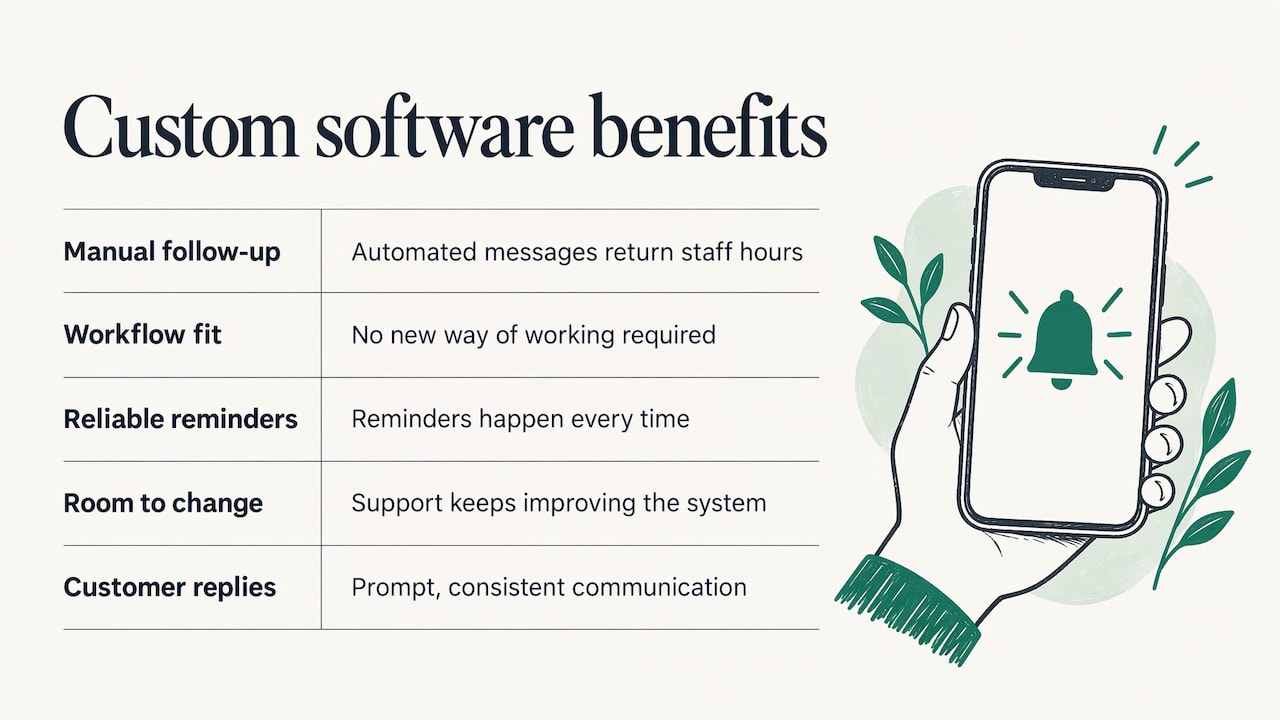
    Less manual follow-up. Most small businesses lose time not on hard tasks but on small ones: remembering to confirm, remind, chase and reply. Software that triggers those messages automatically gives the hours back to the people who would otherwise send them by hand.

    A fit with your actual steps. Because the system is designed after studying how work really moves, your team does not have to learn a new way of working to suit the tool.

    Fewer dropped balls. When a reminder, a check-in or a follow-up is part of the process rather than a person’s good intention, it happens every time.

    Room to change. A system you commission can be adjusted as your operation changes. A build that includes support after launch can keep improving instead of freezing on day one.

    Cleaner customer communication. Guests, callers and clients get a prompt, consistent reply, which is what most of them judge you on.

    These benefits are real but they depend on the build being scoped to a problem you actually have. The best custom projects start small and specific.

    The benefits of custom software for business processes

    Three workflows where custom software earns its keep

    Tasks, reminders and follow-ups

    Disorganized workflow management is the most common reason businesses look for custom software. Work arrives by phone, text and email; follow-ups live in someone’s head; reminders depend on whoever remembers. An assistant that tracks tasks, sends reminders and prompts follow-ups turns that scattered routine into a process. Project G3, our AI-powered assistant, is built for exactly this: streamlining tasks, reminders, check-ins and follow-ups for businesses whose workflow has become hard to manage. See how Project G3 works.

    Event communication

    Event hosts spend a surprising share of their time answering the same questions: where, when, can I bring a guest, did you get my RSVP. Automated texting can handle RSVPs, guest questions, polls and reminders, so the host sees an up-to-date headcount without chasing replies. Our Autonomous SMS Event Coordinator automates these guest interactions for event hosts.

    Texting people at scale also comes with consent obligations, so a responsible setup treats opt-in as part of the design. Our SMS consent page explains how we handle it.

    Missed calls

    A missed call is often a lost customer: the caller moves on to the next business on the list. A system that sends an immediate text to the caller keeps the conversation open until someone can follow up. It is a small piece of software with a direct link to revenue, which makes it a sensible first custom project for service businesses. Our Missed Call Recovery service handles automated SMS for this situation.

    How a custom build moves from idea to launch

    A good build follows a lifecycle, not a leap. Microsoft’s application lifecycle management guidance describes a solution’s path from conception to operation: project and business process management, configuration, development, testing and release management, followed by an operate stage with continuous updates, maintenance and support, new features and planning for the next stage.

    Translated into plain steps, it looks like this:

    1. Understand the workflow. Before anything is built, someone maps how the work is done today: who does what, in what order, where it stalls. This step decides whether the project succeeds. Our approach is to understand your specific workflows before building anything.
    2. Define the scope. Agree on the one or two problems the first version solves, and what is left for later. A short, written scope protects both budget and timeline.
    3. Design. Decide how the tool will look to the people using it, what triggers each action, and how it connects to your existing systems.
    4. Build and test. Development happens in stages, with testing along the way so problems surface before your customers see them.
    5. Release. The system goes live, often to a small group first, with your team shown how it behaves.
    6. Operate and improve. Software is not finished at launch. Real use shows what to adjust, and a good partner keeps tuning the system. Our solutions are designed to continue evolving after launch.

    The mistake to avoid is skipping step one. Software built from a quick description of the problem tends to automate the wrong thing neatly.

    What custom software costs, and what moves the price

    Prices for custom work vary enormously, from a small automation to a full platform, and any single published average hides that spread. It is more useful to know what moves the number:

    • Scope. The number of workflows, user roles and screens is the biggest driver. Starting with one problem keeps the first phase small.
    • Integrations. Each system the software must connect to adds design and testing work.
    • Security and compliance. Handling customer data, payments or messaging consent adds requirements that must be built in, not bolted on.
    • Timeline. Compressed schedules usually cost more than staged ones.
    • Support after launch. Ongoing maintenance and improvement is a real part of the cost over the system’s life, so ask for it to be quoted alongside the build.

    Two ways of paying are common: a project fee for a defined build, and a subscription or access fee for a ready product that is configured for you. Which fits depends on whether your need is unusual or common. We do not publish prices for Project G3, the SMS Event Coordinator, Missed Call Recovery or IT consulting, because the right figure depends on your scope.

    What to evaluate before you commission anything

    Whether you work with us or anyone else, settle these questions before you sign.

    Does the partner understand your operation?

    The first meeting should be about your workflow, not about technology. If the conversation jumps to features before anyone has asked how your week actually runs, the result is likely to be generic.

    How will it integrate?

    List the systems the new software has to coexist with: your phone system, calendar, customer list, accounting tool. Practical technology is the kind that slots into these without making your team learn a new routine.

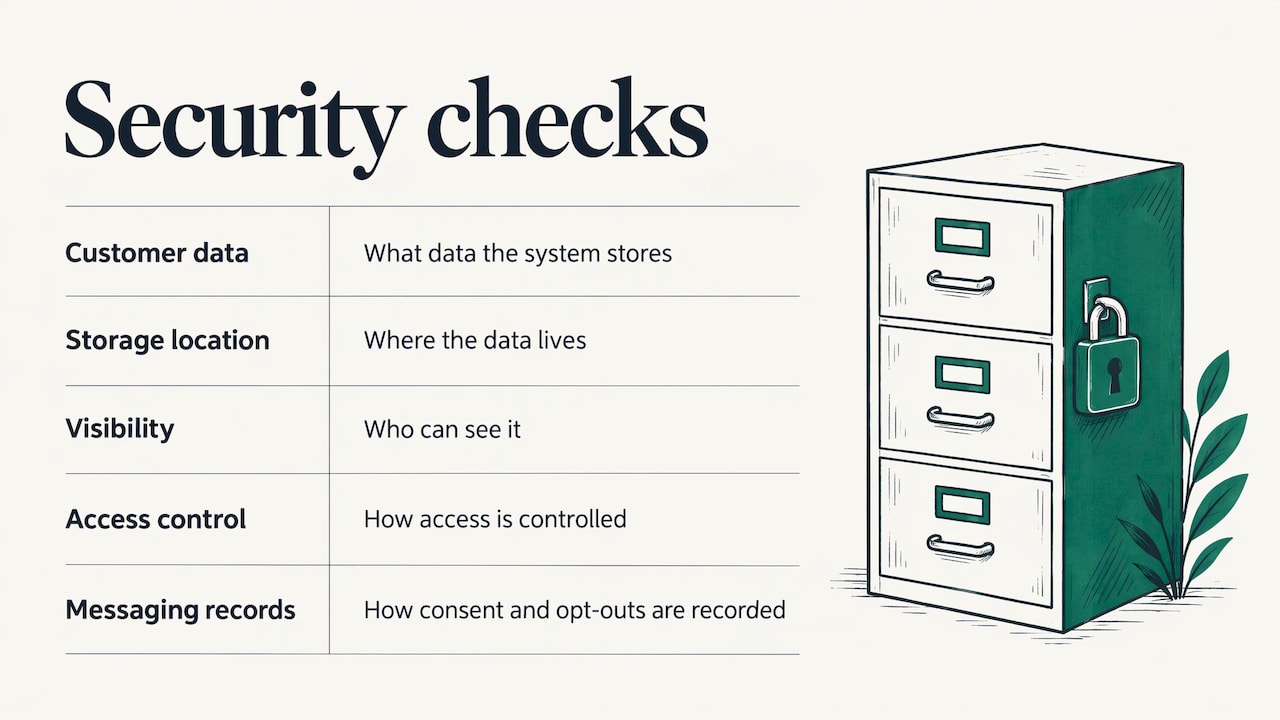
    How is security handled?

    Ask what customer data the system will store, where it lives, who can see it and how access is controlled. For any messaging tool, ask how consent and opt-out are recorded.

    Five security checks for custom software

    Who maintains it?

    Software that is not maintained decays: platforms update, integrations change, needs shift. Agree up front who fixes problems, who adds features and how that is priced.

    Can it grow with you?

    Test the idea with a small number of users or one event or one phone line first. If it works, extend it. A design that starts narrow and expands is cheaper and safer than a large launch.

    Can you say what success looks like?

    Pick a measurable outcome before you start: fewer unanswered calls, faster RSVP counts, fewer hours spent on follow-up. It keeps the project honest and tells you when the software has paid for itself.

    Where GLPS Memphis fits

    We are an IT consulting and custom software company in Memphis, Tennessee. Our aim is practical technology that fits into your existing operations, with as little added complexity as possible. We start by understanding how your business actually works, then build around it, and we keep supporting and improving the system after launch.

    If your main pain is scattered tasks and follow-ups, start with Project G3. If you host events and are tired of chasing replies, look at the Autonomous SMS Event Coordinator. If calls go unanswered while you are with customers, see Missed Call Recovery. For anything that does not fit those, our IT consulting starts with a conversation about your workflow, and you can browse everything on the services page.

    Glpsmemphis

    FAQ

    What is the difference between bespoke and custom software?

    In everyday business use, nothing: both mean software written for one organization’s needs. “Bespoke” is the more common term in British English, and “custom” in American English. Either way, the point is that the design starts from your process rather than from a mass-market product.

    What are some examples of custom business software?

    Examples include a job-tracking app that mirrors your own stages, an assistant that sends reminders and follow-ups, an event tool that collects RSVPs by text, and an automation that texts back callers you could not answer. Integrations that sync data between the systems you already use also count.

    Is custom software only for large companies?

    No. Small businesses often get the clearest return because a single narrow tool, such as automated follow-up or missed-call text-back, removes work that would otherwise fall on the owner or one busy employee. The key is starting with one defined problem.

    How long does it take to build?

    It depends on scope. A focused automation is a much smaller project than an internal platform, and the stages are the same: workflow analysis, design, build, testing and release. Ask any partner for a staged plan so you see value from the first release rather than waiting for everything.

    What happens after launch?

    The system moves into an operate stage with updates, maintenance, support and new features, as lifecycle guidance describes. We build with that in mind and keep improving the system as your operation changes.

    Sources

    Created with BabyLoveGrowth to grow online visibility

  • Customer Onboarding Automation: What to Automate and What to Keep Human

    Customer Onboarding Automation: What to Automate and What to Keep Human

    Customer onboarding automation means using software to handle the repeatable work of welcoming a new customer: reminders, follow-ups, document requests, check-ins and status updates. People then spend their time on the conversations that need judgment. The approach that works is to map your real workflow first, automate the repeatable messages and reminders, and keep a person on anything that grants access or involves a high-value account. That is also how we build at GLPS Memphis: we start by understanding your workflow, then build Project G3 and related tools around it, so the automation fits how your team already works.

    Glpsmemphis
    glpsmemphis.com
    Make Onboarding Fit Your Workflow
    GLPS Memphis builds practical software around your existing operations, helping automate reminders and follow-ups while keeping important conversations human.

    Visit

    TL;DR

    • Onboarding automation handles the repeatable steps (intake, reminders, follow-ups, task creation, status updates) so your team is not chasing each customer by hand.
    • Automate the messages that tell a customer something. Put anything that grants something, such as access or billing, behind a written check.
    • Automation works best on a process that is already consistent, with a named owner, trigger, expected result and deadline for every step.
    • Measure time to first value, stalled steps and how many customers need a human rescue, not just how many emails went out.
    • A custom, workflow-first build usually fits better than forcing your process into a generic tool.

    Table of Contents

    What customer onboarding automation actually is

    IBM describes customer onboarding automation as using software and AI to handle the repetitive tasks of welcoming and setting up new clients, including data entry, routine communications, document collection, scheduling and compliance checks, instead of relying on manual effort.

    In plain terms: every new customer triggers the same dozen small jobs. Someone sends a welcome note, asks for a signed agreement, books a kickoff, reminds the customer when they go quiet, and tells the team when a step is done. Automation runs those jobs on rules you set, so none of them depends on someone remembering.

    It is narrower than “customer automation” in general. It covers the first stretch of the relationship, from signed deal to the moment the customer gets the result they bought. That window is where most of the friction, and most of the lost customers, show up.

    Why the first weeks are worth automating

    Manual onboarding breaks in predictable places. A Moxo study reported by The B2B Marketer, based on 300 company responses, found that 56% of B2B companies name operational delays as the main bottleneck, 45% point to coordination problems between internal teams and 41% to over-reliance on manual processes.

    The same report found that 93% of marketers see automation as the key to onboarding success, yet 56% still experience process delays. Wanting automation and getting it to work are different things, which is why the design matters more than the tool.

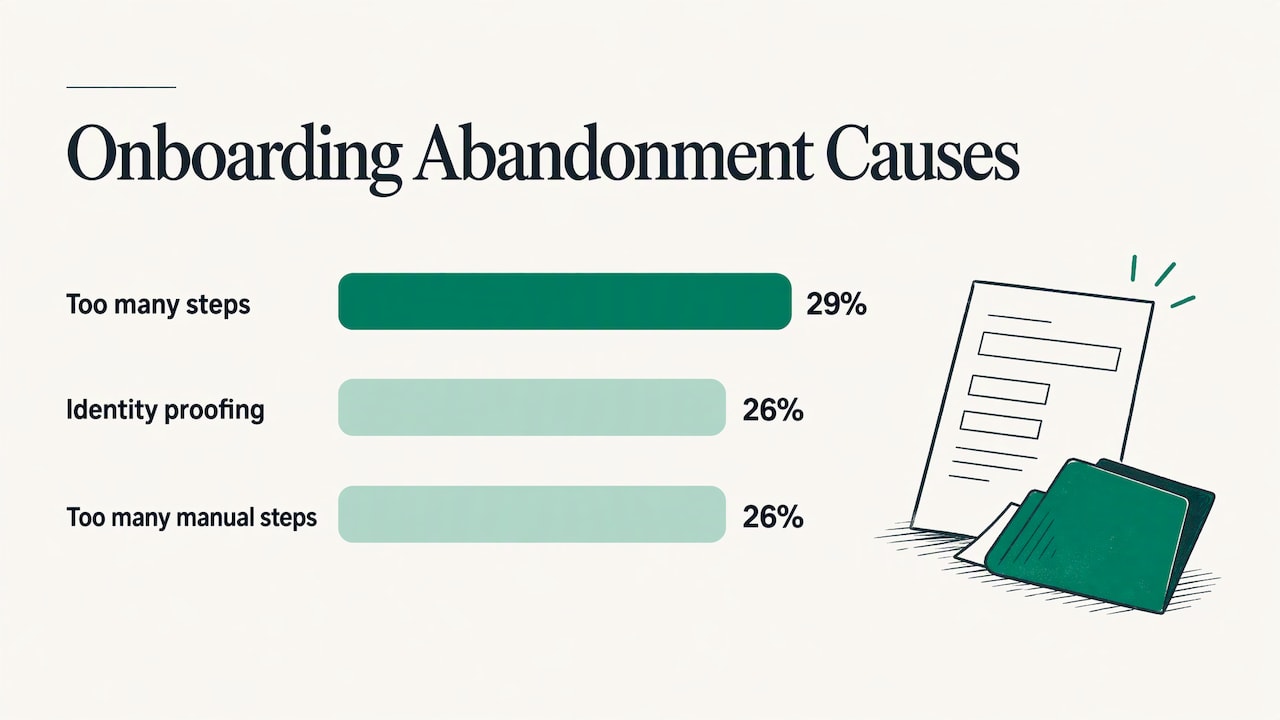
    Drop-off is the other cost. An ABBYY survey from 2022 found that 9 out of 10 organizations see abandonment at onboarding of up to 40%. The top three causes were too many steps (29%), identity proofing (26%) and too many manual steps (26%). Each of those is something a well-built workflow can shorten or smooth.

    Three leading causes of onboarding abandonment

    Which steps to automate

    A useful rule comes from separating two kinds of step. Leapforce’s research splits onboarding into steps that tell the customer something (messages) and steps that grant them something (access, API keys, billing subscriptions). Automate the telling from start to finish. Put every grant behind a verification level you wrote down in advance.

    The reason is reversibility. A wrong email is embarrassing. A wrong account provision or billing start is hard to undo.

    Good candidates for full automation

    • Welcome and next-step messages. Sent the moment a deal closes or a form is submitted.
    • Reminders. A nudge when a document, payment or confirmation is overdue.
    • Follow-ups. A check that a customer has completed the step they were asked to do.
    • Check-ins. A short message a few days in asking whether anything is blocked.
    • Internal task creation. Each new customer opens the same checklist for the right people.
    • Status visibility. Everyone can see which customers are on track and which are stuck.

    Signwell’s guidance lists a similar starting set: intake and data collection, agreements and e-signatures, reminders and follow-ups, internal task creation and status visibility. It also notes that automation works best when the underlying process is already consistent, with defined owners, triggers, expected results and timeframes.

    Steps to keep human or gated

    • Anything that grants access or starts billing. Gate it behind a written check.
    • High-value or complex accounts. IBM advises that the goal is to augment your team, not remove people, with clear escalation triggers and criteria for when a person steps in.
    • At-risk customers. A customer who has gone silent for a set number of days should reach a person, not a fourth automated reminder.
    • Exceptions. Custom terms, unusual requests and disputes.

    How to build the workflow, step by step

    1. Write down the process as it really runs

    Sit with the people who do onboarding today and list every step in order, including the ones that live in someone’s inbox or memory. Automating a process that differs from person to person only makes the inconsistency faster. This is why we begin every engagement by understanding the workflow before building anything: the map is the foundation, and it is where most of the value is found.

    2. Name an owner, a trigger and a deadline for each step

    For every step, write four things: who owns it, what event starts it, what “done” looks like and how long it should take. “Send the intake form” becomes: owner is the account manager, trigger is the signed agreement, done is a completed form, deadline is two business days. If you cannot fill in all four, the step is not ready to automate.

    3. Define what “first value” means

    Onboarding ends when the customer gets the result they bought, not when the kickoff call happens. Write one sentence for each type of customer: when this person does this specific thing and confirms this outcome, onboarding is complete. Everything you build should shorten the path to that sentence.

    4. Split messages from grants

    Mark each step as telling or granting. Telling steps go on full automation. Granting steps get a verification rule: what proof is needed, and who approves when the proof is missing.

    5. Choose the channel your customers answer

    Email is easy to ignore. Many customers reply faster by text, especially for short confirmations, reminders and quick questions. Text-based follow-up suits steps like confirming a time, requesting a missing item or checking that a customer is unblocked.

    6. Build it into the tools you already use

    A workflow that lives outside the systems your team opens every day gets abandoned. Connect the automation to where records, calendars and customer contacts already sit, so nobody has to maintain a second system by hand.

    7. Launch with one customer type, then widen

    Start with the most common onboarding path. Run it, watch where customers stall, fix the rules, then add the next path. Onboarding is never finished on launch day, so plan for revisions from the start.

    A worked example: a services business with a ten-step onboarding

    Take a small firm that signs about twenty new clients a month. Onboarding has ten steps: agreement, intake form, payment, kickoff scheduling, access setup, data upload, a training session, a first deliverable, a check-in and a sign-off.

    Here is how it divides.

    Step Automate? Why
    Welcome message Fully Pure telling, identical every time
    Intake form request and reminders Fully Repeatable, easy to trigger
    Payment reminder Fully Message only; a person confirms the payment status
    Kickoff scheduling Mostly Automated invitation, human handles reschedules
    Access setup Gated A grant: needs a verification check
    Data upload reminders Fully Repeatable follow-ups
    Training session Human Relationship-building
    Check-in after first week Automated, with escalation A person steps in on a negative or missing reply
    Sign-off Human Confirms first value

    Six of ten steps run without anyone touching them, three are partly automated, and the people on the team spend their hours on the training and sign-off conversations that decide whether the customer stays.

    Onboarding for event hosts: the same logic, a different customer

    Onboarding does not only mean software customers. An event host onboards guests: collecting RSVPs, answering the same questions about parking and start times, sending reminders and taking headcounts. The steps are repetitive, time-sensitive and well suited to text.

    Our Autonomous SMS Event Coordinator is built for this case. It automates guest interactions such as RSVPs, questions, polls and reminders, so the host is not answering the same message fifty times. Because guest texting depends on permission, we publish how that works on our SMS consent page.

    Missed calls are an onboarding problem too

    For many businesses, the first contact is a phone call. If nobody picks up, the relationship may end before it starts. Automated text follow-up to a missed call keeps that inquiry alive and moves the person toward the first onboarding step while the interest is fresh. Our Missed Call Recovery service is designed for exactly this gap.

    How to measure whether it works

    Counting messages sent tells you nothing. Measure what changes for customers and for your team.

    • Time to first value. Days from signed deal to the result the customer bought. This is the headline number.
    • Stalled steps. Which step holds customers longest. That is where to redesign next.
    • Completion rate per step. Where customers drop off, echoing the abandonment causes above.
    • Escalation rate. How often a person had to step in, and whether the trigger was right.
    • Team hours per new customer. The admin time that automation was meant to return.
    • Customer confirmation. A short check that the customer felt the process was clear.

    Compare like with like: measure by customer type, since a simple account and a complex one will never onboard at the same speed. Set a baseline before launch so the change is visible.

    Common mistakes

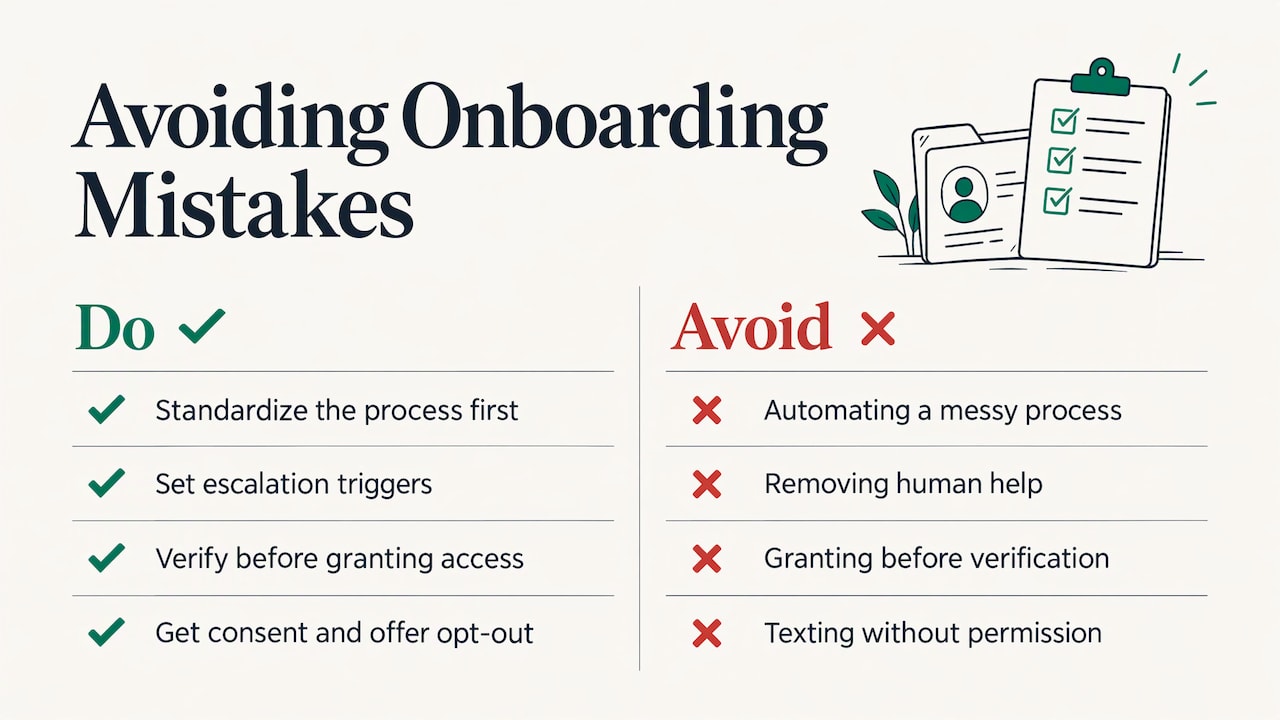
    Automating a messy process. If two staff members onboard differently, the automation inherits the confusion. Fix the process first.

    Removing people entirely. Customers who need a human and cannot reach one leave. Set escalation triggers in advance.

    Granting before verifying. Access and billing steps need written rules. Messages are cheap to fix; provisioning is not.

    Too many steps. Since too many steps was the leading cause of abandonment in the ABBYY survey, cut steps before automating them.

    Treating launch as the finish. Customers behave differently from the way you predicted. The workflow needs reviewing and adjusting after go-live.

    Texting without permission. Automated texts need the recipient’s consent and a clear way to opt out. Build that into the workflow from the start, not afterward.

    Common mistakes

    Where a custom build fits

    Off-the-shelf onboarding platforms are designed around a generic process. If your steps differ, you end up bending your work to fit the software. A tailored build starts from your steps instead.

    That is how we work at GLPS Memphis. We focus on practical technology that integrates with your existing workflows and keeps complexity low, and we study how your operation runs before we build. We also keep supporting and improving the system after launch, which matters because an onboarding workflow needs tuning as you learn from real customers.

    Putting Project G3 to work on onboarding

    Project G3 is our AI-powered assistant for tasks, reminders, check-ins and follow-ups, the very pieces that make up most of an onboarding sequence. Instead of someone tracking who owes what, the assistant keeps the work moving and the follow-ups on schedule.

    Glpsmemphis

    If your onboarding depends on someone remembering to chase a form, confirm a time or check in after the first week, that is the work to hand over. For onboarding built around texting, guest coordination or missed calls, we also offer the SMS Event Coordinator and Missed Call Recovery. To talk through your workflow, start with our IT consulting page, or see everything we offer on our services page.

    FAQ

    What is onboarding automation?

    It is software that performs the repeatable tasks of bringing on a new customer: welcome messages, document requests, reminders, task assignment and status updates. Your team stays involved for judgment calls and relationships. The aim is to remove the chasing, not the people.

    How do I automate the client onboarding process?

    Write down your real process, assign an owner, trigger and deadline to every step, and define what first value means. Automate the steps that only tell the customer something, gate the ones that grant access, and launch with your most common customer type. Then review the results and adjust.

    Which onboarding steps should stay manual?

    Keep a person on high-value or complex accounts, exceptions, at-risk customers and anything that grants access or starts billing without a written verification. Relationship moments such as a training session or final sign-off also belong with your team.

    Can text messages be part of onboarding automation?

    Yes. Text works well for short confirmations, reminders and quick check-ins, and it is how many customers and event guests prefer to reply. Make sure recipients have given consent and can opt out. Our SMS consent page explains how we handle that.

    Sources

    Written with BabyLoveGrowth to get found in AI search