
Custom business software is a system built around the way your company already works, instead of a product you bend your work to fit. It pays off when a workflow is specific to you, when standard tools force clumsy workarounds, or when several systems need to talk to each other. For a growing number of small and mid-sized businesses, the first custom piece is not a giant platform. It is a focused tool that handles reminders, follow-ups, event messages or missed calls so nothing slips. That is the kind of practical, workflow-first software we build at GLPS Memphis.
TL;DR
- Custom business software is code written for your specific processes. Off-the-shelf tools are quicker to start, and custom software fits when your workflow is unusual or your current tools need workarounds.
- The strongest first projects are narrow and repetitive: reminders, check-ins, follow-ups, RSVPs and missed-call text-backs.
- A sound build starts with understanding the workflow, then design, development, testing, release and long-term support.
- Cost depends on scope, integrations, security needs and how much support you want after launch, so get the scope written down before you compare quotes.
- Judge any build partner on how well it understands your operation and whether it keeps improving the system after launch.
Table of Contents
- What custom business software actually is
- Custom vs. off-the-shelf: how to decide
- The benefits of custom software for business processes
- Three workflows where custom software earns its keep
- How a custom build moves from idea to launch
- What custom software costs, and what moves the price
- What to evaluate before you commission anything
- Where GLPS Memphis fits
- FAQ
- Sources
What custom business software actually is
Custom software is code written specifically for one buyer’s needs. The U.S. General Services Administration’s 18F team defines it that way in its guide to choosing software, and advises building only when a unique need is not served by what the marketplace already offers. That test works just as well for a private business.
In practice, “custom business software” covers a wide range:
- A single automation. A tool that texts every guest the night before an event and collects replies.
- An internal application. A scheduling, quoting or job-tracking system shaped around your steps and your vocabulary.
- An assistant layer. Software that handles tasks, reminders and follow-ups across the way your team already works.
- An integration. Connective code that makes your existing systems share data so people stop re-typing it.
You may also hear it called bespoke software, tailor-made software, or business application development. In everyday use they mean the same thing: software made for you rather than for everyone.
Custom vs. off-the-shelf: how to decide
Off-the-shelf software is the right answer more often than software vendors admit, and the honest question is not “which is better” but “where does my work stop fitting the standard shape.”
Standard products are usually faster to start and cheaper up front. They suit standard processes: payroll, basic accounting, generic email. Custom software makes more sense in three situations:
- Your workflow is part of how you win. If the way you qualify a lead, run an event or schedule a crew is what customers value, forcing it into someone else’s template flattens it.
- Your team works around the tool. Spreadsheets next to the software, copy and paste between screens, a person whose job is to keep two systems in agreement. Those are signs the tool does not match the work.
- Several systems need business-specific integration. When data has to move between tools in a way no standard connector handles, code written for your setup removes the manual step.
A mix is also common. Many businesses keep a standard accounting or CRM product and add custom software only at the points where their process is distinctive. A CRM is a good example: a standard one works well when your sales process follows a conventional pattern, and a custom one earns its cost when your own stages and rules differ from the usual template.
A quick test
Write down the three tasks that cost your team the most repeated effort each week. For each one, ask: does a standard tool already do exactly this? If the answer is “almost, with a workaround,” you have found a candidate for custom work.
The benefits of custom software for business processes
The advantages of bespoke software show up in a few concrete ways, and they are easiest to see in communication-heavy work.
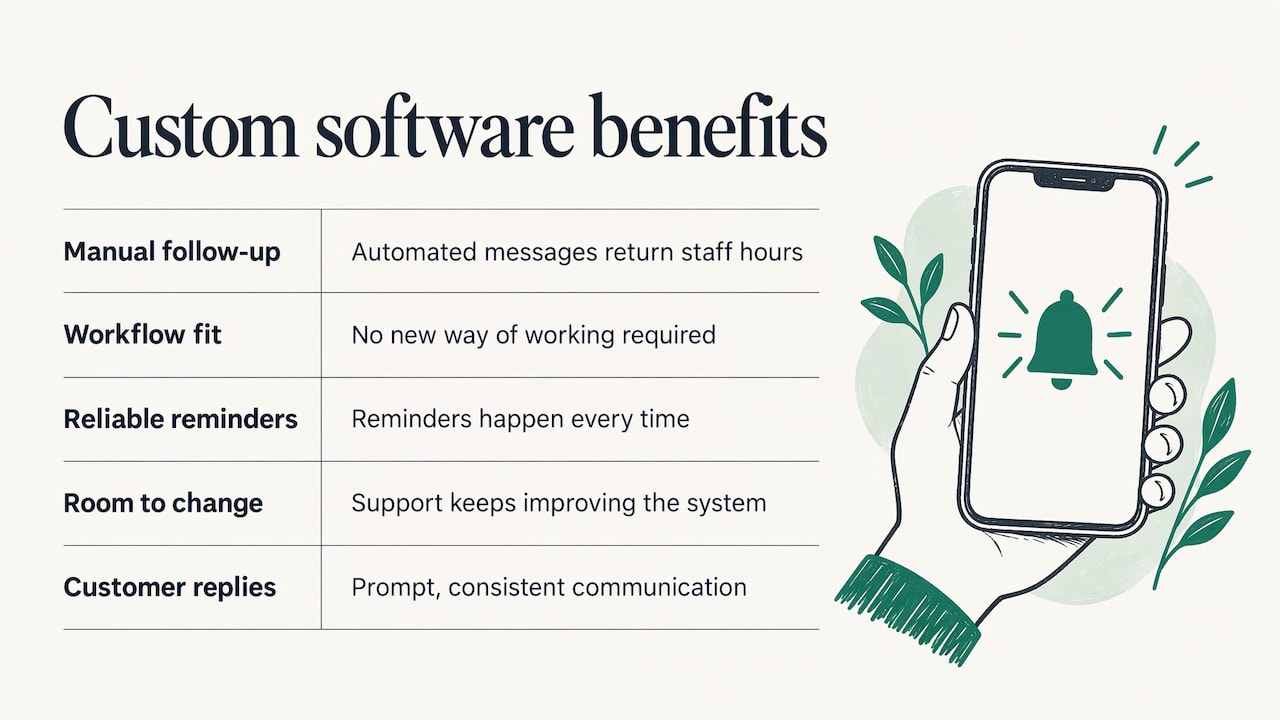
Less manual follow-up. Most small businesses lose time not on hard tasks but on small ones: remembering to confirm, remind, chase and reply. Software that triggers those messages automatically gives the hours back to the people who would otherwise send them by hand.
A fit with your actual steps. Because the system is designed after studying how work really moves, your team does not have to learn a new way of working to suit the tool.
Fewer dropped balls. When a reminder, a check-in or a follow-up is part of the process rather than a person’s good intention, it happens every time.
Room to change. A system you commission can be adjusted as your operation changes. A build that includes support after launch can keep improving instead of freezing on day one.
Cleaner customer communication. Guests, callers and clients get a prompt, consistent reply, which is what most of them judge you on.
These benefits are real but they depend on the build being scoped to a problem you actually have. The best custom projects start small and specific.
Three workflows where custom software earns its keep
Tasks, reminders and follow-ups
Disorganized workflow management is the most common reason businesses look for custom software. Work arrives by phone, text and email; follow-ups live in someone’s head; reminders depend on whoever remembers. An assistant that tracks tasks, sends reminders and prompts follow-ups turns that scattered routine into a process. Project G3, our AI-powered assistant, is built for exactly this: streamlining tasks, reminders, check-ins and follow-ups for businesses whose workflow has become hard to manage. See how Project G3 works.
Event communication
Event hosts spend a surprising share of their time answering the same questions: where, when, can I bring a guest, did you get my RSVP. Automated texting can handle RSVPs, guest questions, polls and reminders, so the host sees an up-to-date headcount without chasing replies. Our Autonomous SMS Event Coordinator automates these guest interactions for event hosts.
Texting people at scale also comes with consent obligations, so a responsible setup treats opt-in as part of the design. Our SMS consent page explains how we handle it.
Missed calls
A missed call is often a lost customer: the caller moves on to the next business on the list. A system that sends an immediate text to the caller keeps the conversation open until someone can follow up. It is a small piece of software with a direct link to revenue, which makes it a sensible first custom project for service businesses. Our Missed Call Recovery service handles automated SMS for this situation.
How a custom build moves from idea to launch
A good build follows a lifecycle, not a leap. Microsoft’s application lifecycle management guidance describes a solution’s path from conception to operation: project and business process management, configuration, development, testing and release management, followed by an operate stage with continuous updates, maintenance and support, new features and planning for the next stage.
Translated into plain steps, it looks like this:
- Understand the workflow. Before anything is built, someone maps how the work is done today: who does what, in what order, where it stalls. This step decides whether the project succeeds. Our approach is to understand your specific workflows before building anything.
- Define the scope. Agree on the one or two problems the first version solves, and what is left for later. A short, written scope protects both budget and timeline.
- Design. Decide how the tool will look to the people using it, what triggers each action, and how it connects to your existing systems.
- Build and test. Development happens in stages, with testing along the way so problems surface before your customers see them.
- Release. The system goes live, often to a small group first, with your team shown how it behaves.
- Operate and improve. Software is not finished at launch. Real use shows what to adjust, and a good partner keeps tuning the system. Our solutions are designed to continue evolving after launch.
The mistake to avoid is skipping step one. Software built from a quick description of the problem tends to automate the wrong thing neatly.
What custom software costs, and what moves the price
Prices for custom work vary enormously, from a small automation to a full platform, and any single published average hides that spread. It is more useful to know what moves the number:
- Scope. The number of workflows, user roles and screens is the biggest driver. Starting with one problem keeps the first phase small.
- Integrations. Each system the software must connect to adds design and testing work.
- Security and compliance. Handling customer data, payments or messaging consent adds requirements that must be built in, not bolted on.
- Timeline. Compressed schedules usually cost more than staged ones.
- Support after launch. Ongoing maintenance and improvement is a real part of the cost over the system’s life, so ask for it to be quoted alongside the build.
Two ways of paying are common: a project fee for a defined build, and a subscription or access fee for a ready product that is configured for you. Which fits depends on whether your need is unusual or common. We do not publish prices for Project G3, the SMS Event Coordinator, Missed Call Recovery or IT consulting, because the right figure depends on your scope.
What to evaluate before you commission anything
Whether you work with us or anyone else, settle these questions before you sign.
Does the partner understand your operation?
The first meeting should be about your workflow, not about technology. If the conversation jumps to features before anyone has asked how your week actually runs, the result is likely to be generic.
How will it integrate?
List the systems the new software has to coexist with: your phone system, calendar, customer list, accounting tool. Practical technology is the kind that slots into these without making your team learn a new routine.
How is security handled?
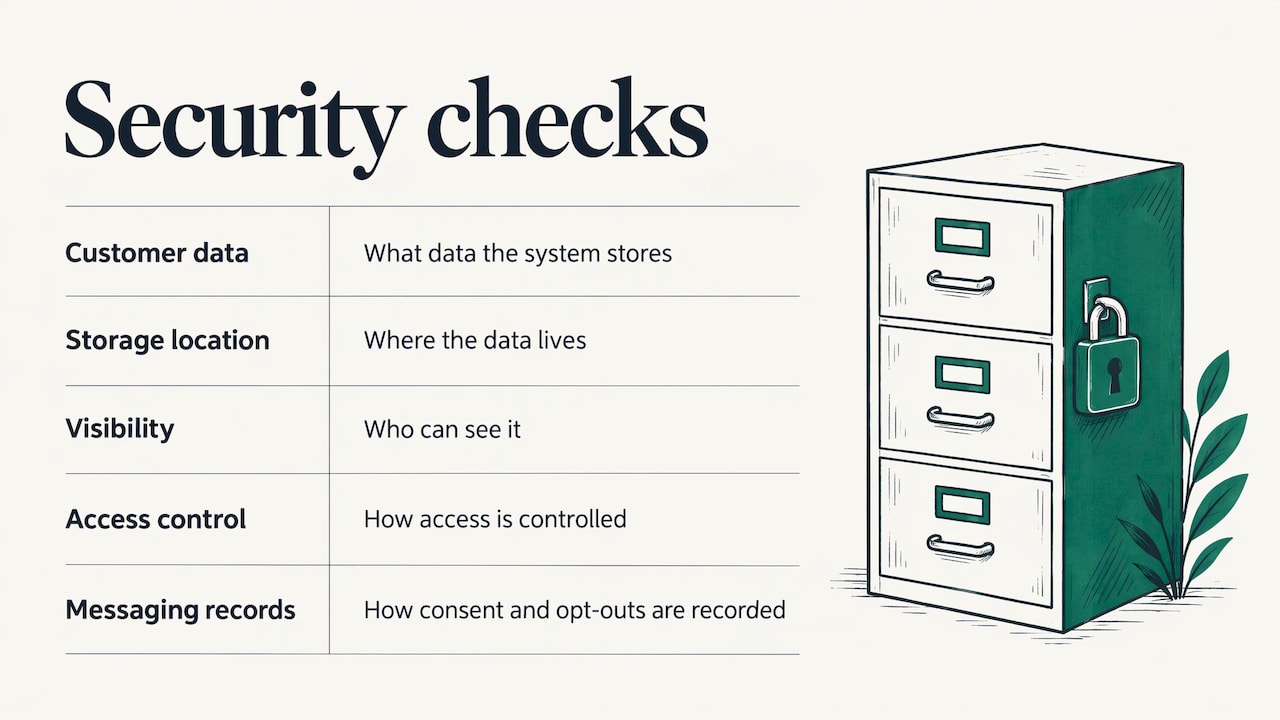
Ask what customer data the system will store, where it lives, who can see it and how access is controlled. For any messaging tool, ask how consent and opt-out are recorded.
Who maintains it?
Software that is not maintained decays: platforms update, integrations change, needs shift. Agree up front who fixes problems, who adds features and how that is priced.
Can it grow with you?
Test the idea with a small number of users or one event or one phone line first. If it works, extend it. A design that starts narrow and expands is cheaper and safer than a large launch.
Can you say what success looks like?
Pick a measurable outcome before you start: fewer unanswered calls, faster RSVP counts, fewer hours spent on follow-up. It keeps the project honest and tells you when the software has paid for itself.
Where GLPS Memphis fits
We are an IT consulting and custom software company in Memphis, Tennessee. Our aim is practical technology that fits into your existing operations, with as little added complexity as possible. We start by understanding how your business actually works, then build around it, and we keep supporting and improving the system after launch.
If your main pain is scattered tasks and follow-ups, start with Project G3. If you host events and are tired of chasing replies, look at the Autonomous SMS Event Coordinator. If calls go unanswered while you are with customers, see Missed Call Recovery. For anything that does not fit those, our IT consulting starts with a conversation about your workflow, and you can browse everything on the services page.
FAQ
What is the difference between bespoke and custom software?
In everyday business use, nothing: both mean software written for one organization’s needs. “Bespoke” is the more common term in British English, and “custom” in American English. Either way, the point is that the design starts from your process rather than from a mass-market product.
What are some examples of custom business software?
Examples include a job-tracking app that mirrors your own stages, an assistant that sends reminders and follow-ups, an event tool that collects RSVPs by text, and an automation that texts back callers you could not answer. Integrations that sync data between the systems you already use also count.
Is custom software only for large companies?
No. Small businesses often get the clearest return because a single narrow tool, such as automated follow-up or missed-call text-back, removes work that would otherwise fall on the owner or one busy employee. The key is starting with one defined problem.
How long does it take to build?
It depends on scope. A focused automation is a much smaller project than an internal platform, and the stages are the same: workflow analysis, design, build, testing and release. Ask any partner for a staged plan so you see value from the first release rather than waiting for everything.
What happens after launch?
The system moves into an operate stage with updates, maintenance, support and new features, as lifecycle guidance describes. We build with that in mind and keep improving the system as your operation changes.
Sources
- Understanding and choosing a software solution, 18F, U.S. General Services Administration
- Bring successful solutions to customers with application lifecycle management, Microsoft Learn
Leave a Reply